When a Proxy Won't Connect, What Should You Check First?
Check your machine before checking the remote end. The vast majority of connection failures happen before the request ever leaves the local environment.
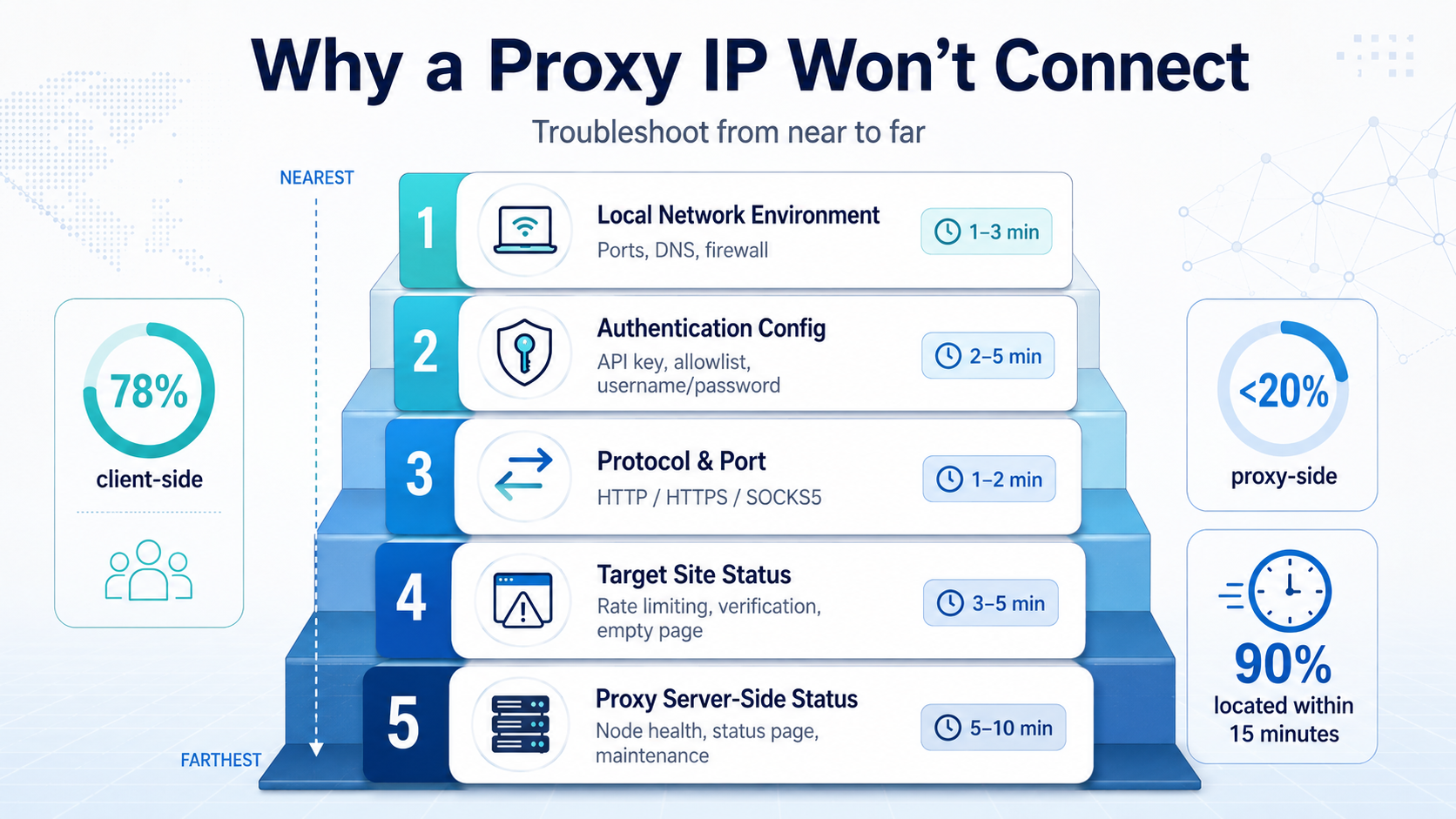
Many technical teams' first instinct when a proxy won't connect is "the IP got blocked," followed by immediately swapping in a fresh batch of IPs. But industry troubleshooting data shows that in enterprise scraping scenarios, roughly 78% of proxy connection failures are ultimately traced to the client side, with fewer than 20% actually caused by the proxy service.
That means troubleshooting should follow a near-to-far principle:
| Layer | What to Check | Typical Time |
|---|---|---|
| Layer 1 | Local network environment | 1-3 min |
| Layer 2 | Authentication config | 2-5 min |
| Layer 3 | Protocol and port | 1-2 min |
| Layer 4 | Target site status | 3-5 min |
| Layer 5 | Proxy server-side status | 5-10 min |
Walk through in this order, and over 90% of connection issues can be pinpointed within 15 minutes. Skipping the first three layers and jumping straight to blaming the server slows down troubleshooting by 3-5x.
Can the Local Network Environment Cause Connection Failures?
Yes—and it's the most common hidden cause. Local network issues account for 35%-40% of proxy connection failure tickets.
Take a sentiment monitoring scenario: one data team's scraping tasks suddenly all started timing out. Investigation revealed it wasn't the proxy that had died—the company's internal firewall had been upgraded, and by default it blocked all outbound traffic on non-80/443 ports. The proxy's SOCKS5 port was being blocked outright.
Items to check one by one at the local network layer:
1. Are outbound ports open?
bash
telnet proxy_address proxy_port
# or
curl -x http://proxy_address:port http://httpbin.org/ip
If telnet returns "Connection refused" or hangs with no response, the network link between you and the proxy server has a problem.
2. Is DNS resolution working?
bash
nslookup proxy_domain
# or
dig proxy_domain
Some proxy services use a domain name rather than an IP for access. DNS poisoning or resolution timeouts will directly cause connection failures. This is especially common in enterprise intranet environments.
3. Are there conflicting system proxy settings?
| Conflict Type | Symptom | Fix |
|---|---|---|
| Global proxy override | Proxy chained on proxy—request loops locally | Disable system global proxy or VPN |
| Environment variable leftover | http_proxy/https_proxy points to an old address | Clear or update environment variables |
| Browser extension interference | Extension hijacks proxy config | Disable proxy-related browser extensions |
4. Firewall and security software blocking
In enterprise environments, endpoint security software and egress firewalls are the most easily overlooked blocking sources. Industry experience shows that about 15% of "proxy won't connect" issues ultimately trace back to security policy. Temporarily disabling the firewall to test connectivity is the fastest verification method.
What Are the Common Signs of Authentication Errors?
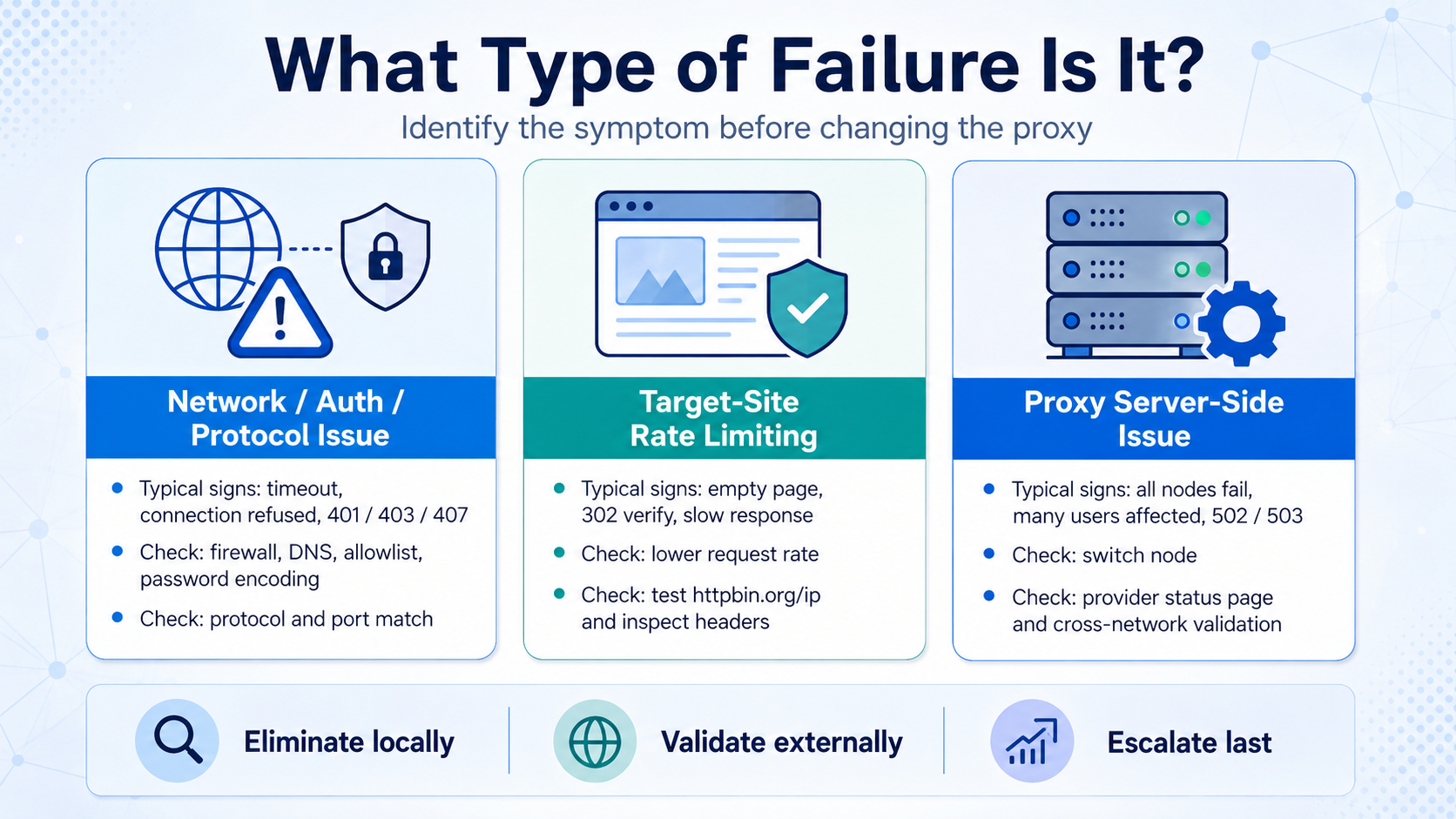
Authentication errors typically return a 407 or 403 status code rather than a timeout. That's the key signal distinguishing auth issues from network issues.
Authentication is the second-largest source of failure tickets, accounting for 20%-25%. There are three common auth methods: API Key, IP allowlist, and username/password. Each has its own common pitfalls.
| Auth Method | Common Error | Error Signature | Fix Direction |
|---|---|---|---|
| API Key | Key expired or incompletely copied | HTTP 401/403 | Regenerate and check for stray whitespace |
| IP Allowlist | Local egress IP changed | Refused/timeout | Verify current egress IP and update allowlist |
| Username/Password | Password contains unescaped special chars | HTTP 407 | URL-encode special characters |
Worth special attention is the hidden trap of IP allowlist authentication: many enterprise office networks don't have a fixed egress IP. After a DHCP lease renewal or an ISP-side adjustment, the egress IP changes. If your auth is IP-allowlist based, once the egress IP shifts, every proxy request gets rejected immediately.
This problem is especially frequent in website scraper scenarios. A practical check:
bash
# Confirm current egress IP
curl http://httpbin.org/ip
# Compare the returned IP against the allowlist in your proxy console
Another high-frequency error: when the password contains characters like @, :, or #, plugging it directly into the proxy URL will break parsing. The correct approach is URL-encoding—for instance, @ becomes %40.
What Happens When the Proxy Protocol or Port Doesn't Match?
The typical symptom of a protocol mismatch is a successful connection but garbled response data, or an outright handshake failure. These issues account for roughly 10%-15% of cases.
Proxy services typically support one or more of HTTP, HTTPS, and SOCKS5. The protocol your client requests must match the protocol the proxy server is configured for exactly, or you'll see:
| Mismatch | Symptom | Impact |
|---|---|---|
| HTTP protocol against a SOCKS5 port | Handshake fails, garbled response | All requests fail |
| SOCKS5 protocol against an HTTP port | Connection timeout | All requests fail |
| HTTP protocol accessing an HTTPS target | Proxy returns 200 but target returns cert error | Data collection anomalies |
| HTTPS tunnel proxy without CONNECT enabled | TLS handshake failure | HTTPS sites unreachable |
Verification approach:
Step 1: Confirm which protocols the proxy server supports. This info lives in the proxy service's control panel or API docs.
Step 2: Confirm the protocol declaration in your client code. Python requests library syntax:
python
# HTTP proxy
proxies = {"http": "http://user:pass@host:port"}

# SOCKS5 proxy
proxies = {"http": "socks5://user:pass@host:port",
           "https": "socks5://user:pass@host:port"}
Step 3: Double-check the port number. Different protocols usually use different ports—mixing them up is a common beginner mistake. Industry conventions are 8080/8888 for HTTP and 1080 for SOCKS5, but always follow the specific proxy provider's documentation.
How Do You Tell If It's Target-Site Rate Limiting?
If the same batch of proxy IPs accesses Site A fine but times out on every request to Site B, the problem is very likely target-site rate limiting. This isn't a proxy connection failure—it's the target site actively rejecting requests.
In ad monitoring scenarios, this is extremely typical. Ad platforms are highly sensitive to request frequency from a given source. Once rate limiting kicks in, the response often isn't a clear 403 but various "soft rejections":
| Rejection Type | Symptom | Easily Misread As |
|---|---|---|
| Silent packet drop | Timeout, no response | Proxy server failure |
| Empty page return | HTTP 200 but empty body | Proxy data transfer anomaly |
| 302 redirect to verification | Human-verification page returned | Poor proxy IP quality |
| Throttled response | Response time jumps from 200ms to 8-10s | High proxy network latency |
| Fake data returned | HTTP 200 but content doesn't match | Parsing logic error |
The diagnostic method is straightforward:
- Use the same proxy IP to hit a public test endpoint like
httpbin.org/ip. If it returns normally, the proxy itself is fine. - Lower request frequency to 5-10 requests per minute and see if the target site's normal response returns.
- Check that request headers are complete—especially User-Agent, Referer, and Cookie fields.
Industry data indicates that in enterprise-scale scraping, about 25% of "proxy failures" are actually target-site rate limiting rather than proxy service issues. Distinguishing between the two prevents a lot of wasted IP-rotation cycles.
How Do You Confirm It's a Server-Side Problem?
Only after ruling out the first four layers should you consider a proxy server-side issue. Server-side failures are relatively rare, but when they happen they're usually across the board.
Typical signatures of a server-side failure:
- Total failure: not individual IPs failing, but all IPs failing simultaneously
- Multiple users hit at once: if several people on the team see the problem at the same time, it's very likely server-side
- Status page anomalies: most proxy providers offer a status page or health-check API endpoint
- Sudden shift in response pattern: previously working proxies suddenly all return 502/503
Steps to confirm a server-side issue:
bash
# 1. Test basic proxy connectivity with the simplest possible request
curl -v -x http://proxy_address:port http://httpbin.org/ip

# 2. Test multiple different proxy nodes
# All nodes fail → server-side problem
# Some nodes work → possibly maintenance on specific nodes

# 3. Check the proxy provider's status page or announcements
One thing to note: a proxy IP reaching the end of its lifespan will also present as a connection failure. Rotating proxies typically live for 1-30 minutes. If your code caches an expired IP address without refreshing in time, you'll get persistent connection failures. That's not a server-side fault—it's an IP lifecycle management issue.
For long-running scenarios like sentiment monitoring, it's advisable to build IP expiration detection and automatic refresh into the code rather than waiting for connection failures to react.
What Does the Full Troubleshooting Flow Look Like?
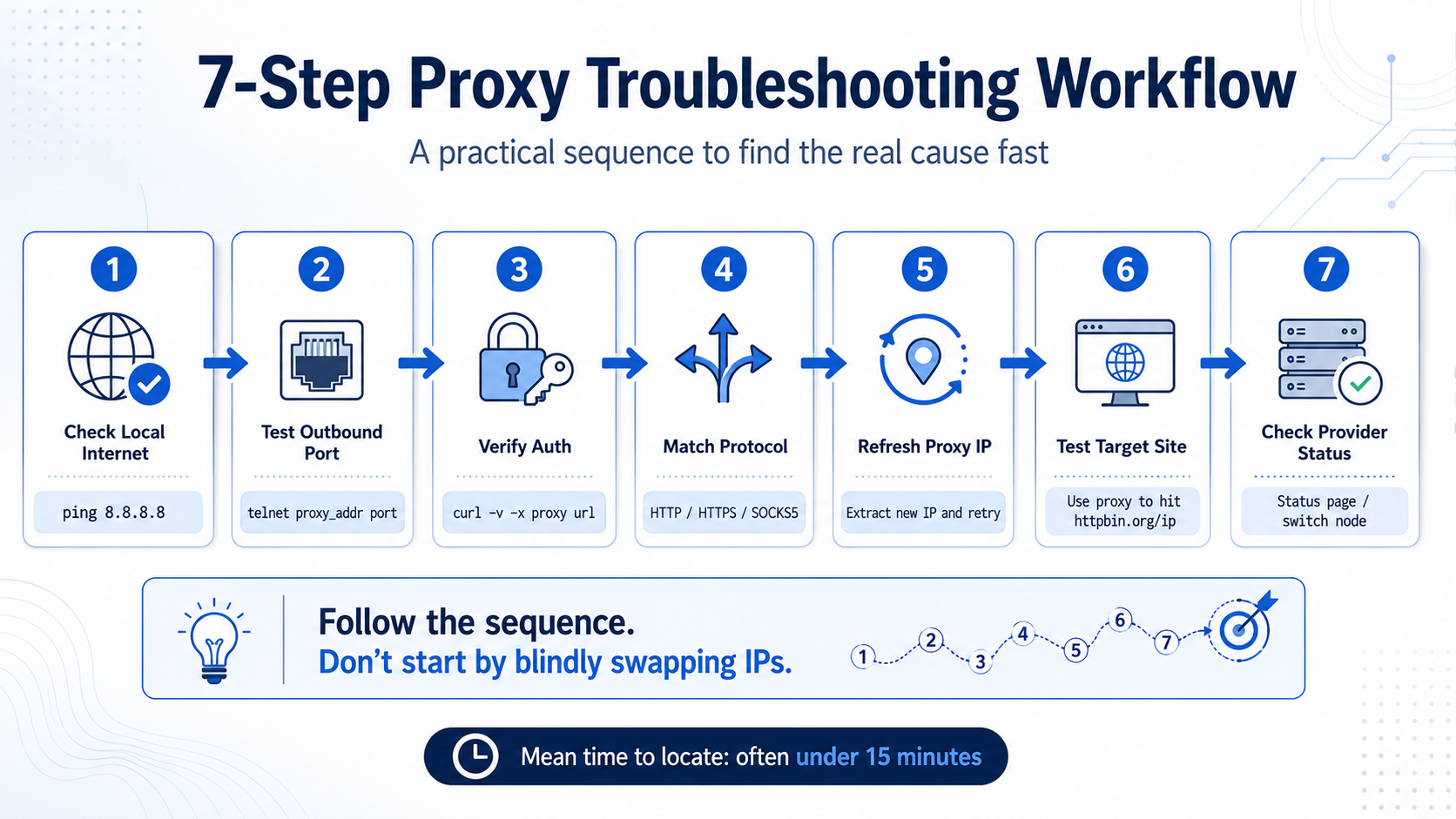
Seven steps, walked through in order—the vast majority of proxy IP connection issues can be located within 15 minutes.
| Step | Check | Tool/Command | Expected Result | If Pass → |
|---|---|---|---|---|
| 1 | Local internet access | ping 8.8.8.8 | Normal response | Go to Step 2 |
| 2 | Outbound port open | telnet proxy_addr port | Connected | Go to Step 3 |
| 3 | Auth info correct | curl -v -x proxy url | No 401/403/407 | Go to Step 4 |
| 4 | Protocol matches | Compare proxy protocol with code | Consistent | Go to Step 5 |
| 5 | Proxy IP alive | Extract new IP and retry | New IP works | Go to Step 6 |
| 6 | Target site healthy | Use proxy to hit httpbin.org | Normal return | Go to Step 7 |
| 7 | Provider status normal | Check status page / switch node | Full recovery | Issue located |
Common troubleshooting misconceptions:
- Misconception 1: Swap IPs the moment something won't connect. If the issue is in local config, no amount of IP swapping helps—and you burn through your quota.
- Misconception 2: Only look at HTTP status codes. Some connection failures don't return a status code at all—they present as pure timeouts—so you also need to watch TCP-layer connection state.
- Misconception 3: Ignore the time dimension. If failures only occur in specific time windows, they may be linked to network congestion or the proxy provider's maintenance windows.
A practical suggestion: build a lightweight health-check module into your scraping framework that hits a test endpoint through the proxy every 5 minutes. When health checks fail three times in a row, trigger an alert and automatically output diagnostics following the 7-step sequence above. In website scraper and ad monitoring scenarios, this can compress mean-time-to-locate from 30 minutes to under 5.
A proxy "not connecting" is only the surface. Behind it could be a problem at the network layer, auth layer, protocol layer, target site, or server side. Rather than trial-and-error, walk through every layer with a fixed procedure. The essence of troubleshooting isn't guessing—it's elimination.
FAQ
Q: What's the difference between "proxy IP won't connect" and "proxy IP is blocked"?
Won't connect means the TCP connection can't even be established—symptoms are timeout or Connection refused, with root causes usually in the network link or auth config. Blocked means the connection succeeded and the request was sent, but the target site returned 403, a CAPTCHA, or an empty page. The troubleshooting directions differ completely: the former means checking local and proxy server-side; the latter means checking request strategy and target-site mechanics.
Q: Why does it still fail after switching to a new IP?
If the failure persists after swapping IPs, the problem is very likely not in the IP itself. The three most common causes: local outbound ports blocked by a firewall, egress IP in the auth allowlist has expired, or the protocol declared in code doesn't match the proxy's actual protocol. Restart the 7-step process from Step 1.
Q: How do I tell whether the proxy server is down or it's a local issue?
The fastest method is "cross-validation": test the same proxy config from another device or another network environment. If it also fails there, it's very likely server-side; if it works there, the issue is in your local environment. You can also check the proxy provider's status page or ping their tech support.
Q: What's the difference between a proxy connection timeout and a connection refused?
Timeout means the TCP SYN packet went out but no response came back—common causes are port blocked by firewall, proxy server overload, or link outage. Refused means a RST packet came back, indicating no service is listening on the target port—common causes are wrong port number, proxy service not running, or IP not on the allowlist.
Q: My scraping tasks ran fine for a while and then all started timing out. What could be causing this?
Three most common scenarios: (1) a batch of short-lived proxy IPs expired and the code has no auto-refresh mechanism; (2) target-site rate limiting kicked in and started silent packet drops; (3) the local egress IP changed and invalidated allowlist auth. Check IP lifespan status, test the target site at lower frequency, and verify egress IP—in that order—for a quick diagnosis.
Q: How do error messages differ between SOCKS5 and HTTP proxies when connections fail?
HTTP proxy failures usually return an explicit HTTP status code—407 for auth failure, 502 for gateway error, etc. SOCKS5 proxy errors are lower-level, typically showing as connection timeouts or non-standard response data. Many HTTP client libraries just throw a "connection error" without specifics. When troubleshooting SOCKS5, use a dedicated SOCKS5-supporting tool rather than reading HTTP-layer logs.




