The budget black hole platform dashboards can't see — the real cost risk in cross-border advertising
Most cross-border e-commerce teams judge ad performance off three numbers in the platform's back-end dashboard: impressions, click-through rate, and conversion rate. This judgment has a structural blind spot: the dashboard reflects "what the delivery side recorded," not "what users actually saw."
Third-party monitoring data shows that in 2025, invalid traffic (IVT) accounted for over 20% of global digital advertising, based on analysis of more than 100 billion impression samples. Translated into budget loss, global advertisers waste more than $32 billion annually to invalid traffic and fraud. For cross-border e-commerce, the problem is worse — ads run across multiple countries and regions, and each market may have different ad rendering logic, geo-targeting precision, and creative localization. But advertisers sitting in their home offices only see aggregated numbers in the back end.
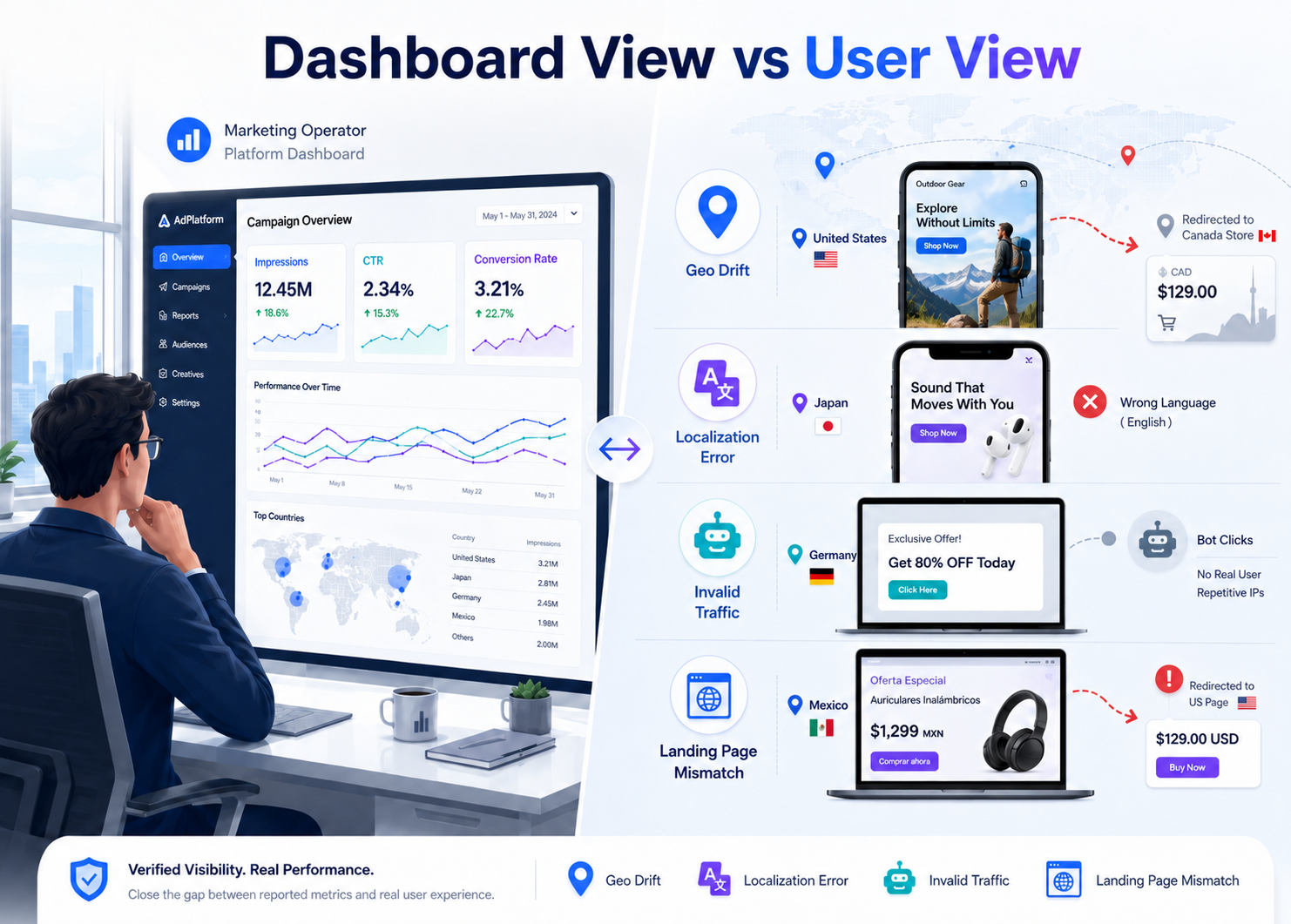
Typical budget waste paths:
| Waste type | What's happening | Visible in the dashboard? |
|---|---|---|
| Geo-targeting drift | Ad targeted at Texas, US — actually shown to users in Mexico | No, the dashboard only records "delivered" |
| Creative rendering anomalies | Japan-market ad shows English-version creative; localization failed | No, the dashboard only counts impressions |
| Invalid traffic consumption | Botnets generate large click volumes — abnormally low conversion alongside normal click rate | Partially visible, but platforms tend not to surface this proactively |
| Landing page geo mismatch | User clicks German ad and lands on US site — currency and shipping are wrong | No, the dashboard only tracks the click event |
In ad monitoring scenarios, these four issue types account for most of the budget waste in cross-border e-commerce advertising. The solution isn't more dashboards — it's a different vantage point: verifying the real ad presentation from the user side.
The core logic of ad verification: recreating the user view from the target market's network environment
The role of proxy IPs in ad verification is essentially this: let verification requests originate from the real network environment of the target market, simulating local users' browsing behavior.
Ad platforms' geo-targeting depends on the IP address to determine user location. If the verification request comes from a home-country IP, the ad platform responds by rules for home-country users — the returned ad content, targeting logic, and landing page are all different from what target-market users see. Only with an IP from the target market itself can you see the ads that region's users actually receive.
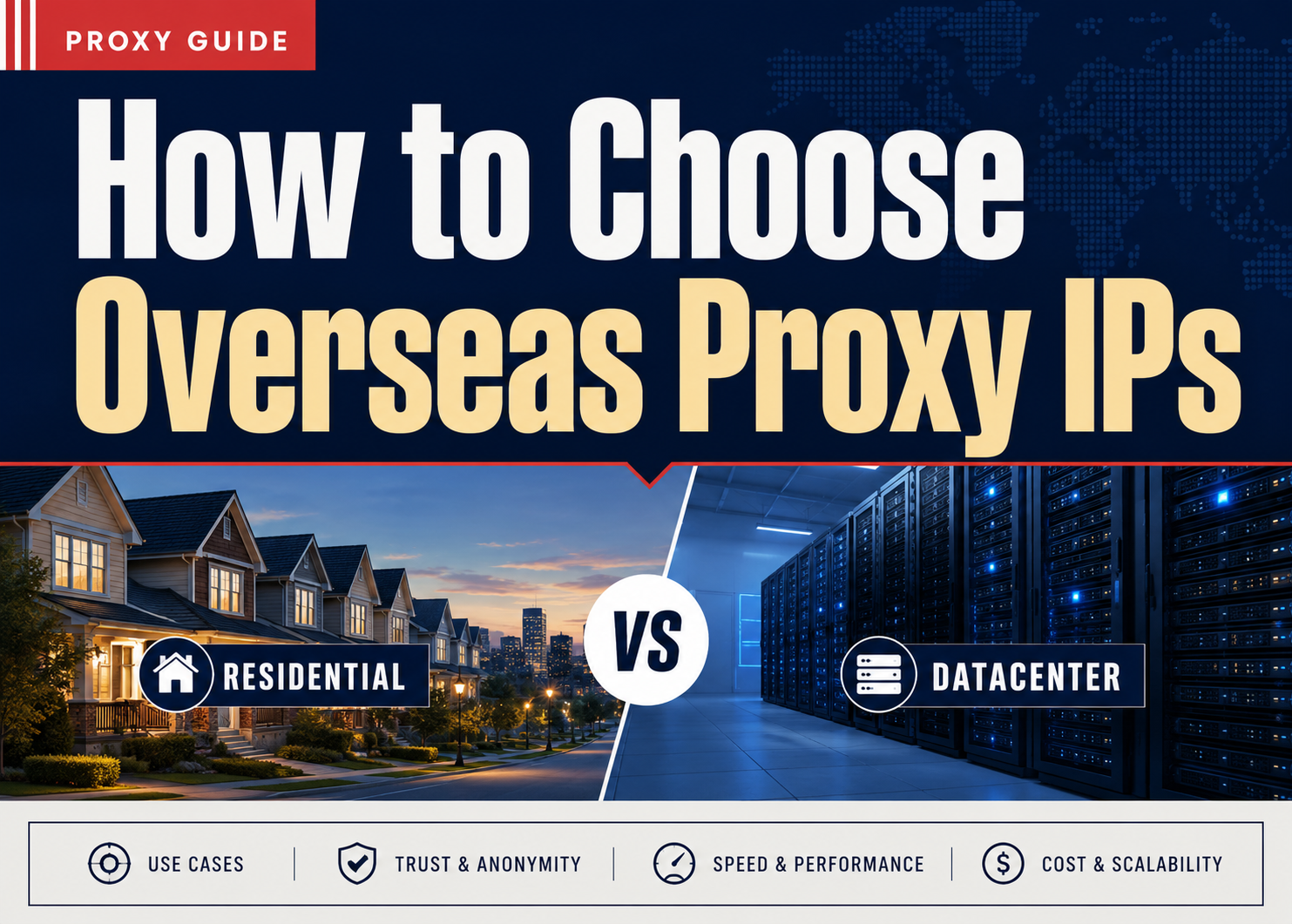
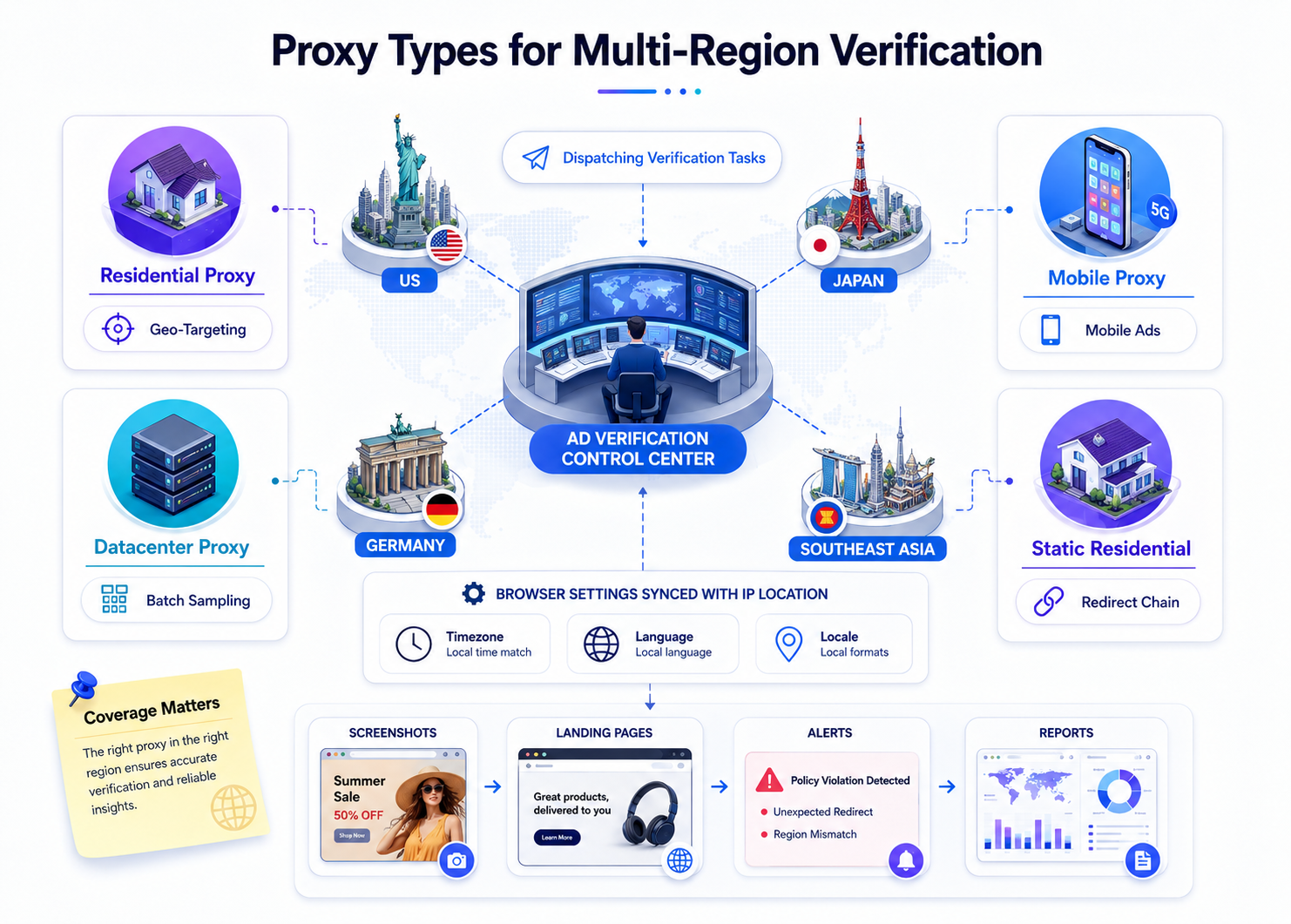
Proxy IP type ↔ ad verification scenario match-up:
| Proxy IP type | Verification scenario | Why it fits |
|---|---|---|
| Residential proxy IP | Creative rendering verification, geo-targeting precision check | Real residential IP assigned by a local ISP; the ad platform treats it as an ordinary user and returns real ad content |
| Datacenter proxy IP | Large-batch impression sampling, high-frequency automated scripts | Fast response, strong concurrency — fits high-volume automated URL checking in short windows |
| Mobile proxy IP | Mobile ad verification, in-app ad detection | IP from mobile carrier address ranges; simulates real mobile-user network environments |
| Static residential proxy IP | Multi-step ad chain verification (click → redirect → landing page → checkout page) | IP stays unchanged during the session; can trace the full chain from ad impression to conversion |
Key criterion: the higher the verification precision required, the more you need residential proxy IPs. Datacenter IPs are fast, but some ad platforms can identify datacenter IP ranges and may return different content than ordinary users see. Industry monitoring data shows traffic from cloud infrastructure had an IVT rate close to 80% in Q1 2026 — ad platforms' detection and filtering mechanisms for datacenter IPs are already mature.
The full 6-step cross-border ad verification workflow
Cross-border ad verification isn't "fire up a proxy and take a quick look." A competent verification covers the full chain from objective-setting to result archival.
Step 1: Define verification objectives and target market coverage
Before kicking off verification, answer three questions:
- What are you verifying? — geo-targeting precision, creative localization, or invalid traffic detection? Different objectives drive different proxy IP choices and check cadence.
- Which markets are in scope? — list the countries/regions where ads run, rank by budget share, and prioritize verifying the top-5 budget markets.
- How often? — daily routine check (1x/day), campaign-period tighter cadence (every 4 hours), or one-shot full sweep before launch?
Verification objective × configuration quick-reference:
| Verification objective | Proxy IP type required | Suggested markets per run | Suggested frequency |
|---|---|---|---|
| Geo-targeting precision | Residential (country + city-level) | 3–5 target markets | Daily |
| Creative localization | Residential | All delivery markets | Full sweep pre-launch + weekly sampling |
| Invalid traffic detection | Datacenter + residential mix | All markets | Continuous monitoring |
| Landing page chain integrity | Static residential | Top-5 budget markets | Daily |
Step 2: Configure proxy IP geo-parameters
Proxy IP geo-precision directly determines verification reliability. Cross-border ad verification needs country-level geo at minimum; high-precision scenarios (e.g. city-level ad targeting) need city-level.
Configuration essentials:
- Country-level: fits most cross-border e-commerce scenarios — verifying whether ads show in the target country
- City-level: fits localized delivery (e.g. different ads across US states), regional promotional campaign verification
- ISP-level: fits mobile ad verification — needs to simulate a specific carrier's user environment
- Browser timezone & language sync: when the proxy IP switches to the target market, the browser's timezone,
Accept-Languageheader, and locale settings have to switch in sync — otherwise the ad platform's fingerprint detection may catch the inconsistency
# Pseudocode: environment-parameter configuration for an ad verification request
proxy_config = {
    "country": "US",
    "state": "Texas",
    "city": "Houston",
    "type": "residential"
}

browser_config = {
    "timezone": "America/Chicago",
    "language": "en-US",
    "locale": "en_US",
    "user_agent": "Mozilla/5.0 (Windows NT 10.0; Win64; x64)..."
}
Step 3: Execute the verification request
The verification request needs to simulate real user browsing behavior — not just fire an HTTP request.
Execution checklist:
- Access the ad surface via the proxy IP (search engine results, social feed, affiliate sites, etc.)
- Record whether the ad is shown, its position, and the creative content (save a screenshot)
- Click the ad, record the redirect chain (any tracking-redirect intermediaries? did the redirect complete?)
- On the landing page, verify language, currency, and shipping info match the target market
- Record response time (milliseconds from click to landing page fully loaded)
Typical verification flow in ad monitoring:
[Proxy IP connects] → [Visit ad surface] → [Confirm ad served] → [Screenshot]
     ↓
[Click ad] → [Record redirect chain] → [Reach landing page] → [Verify localization params]
     ↓
[Cross-reference with platform dashboard] → [Flag anomalies] → [Archive results]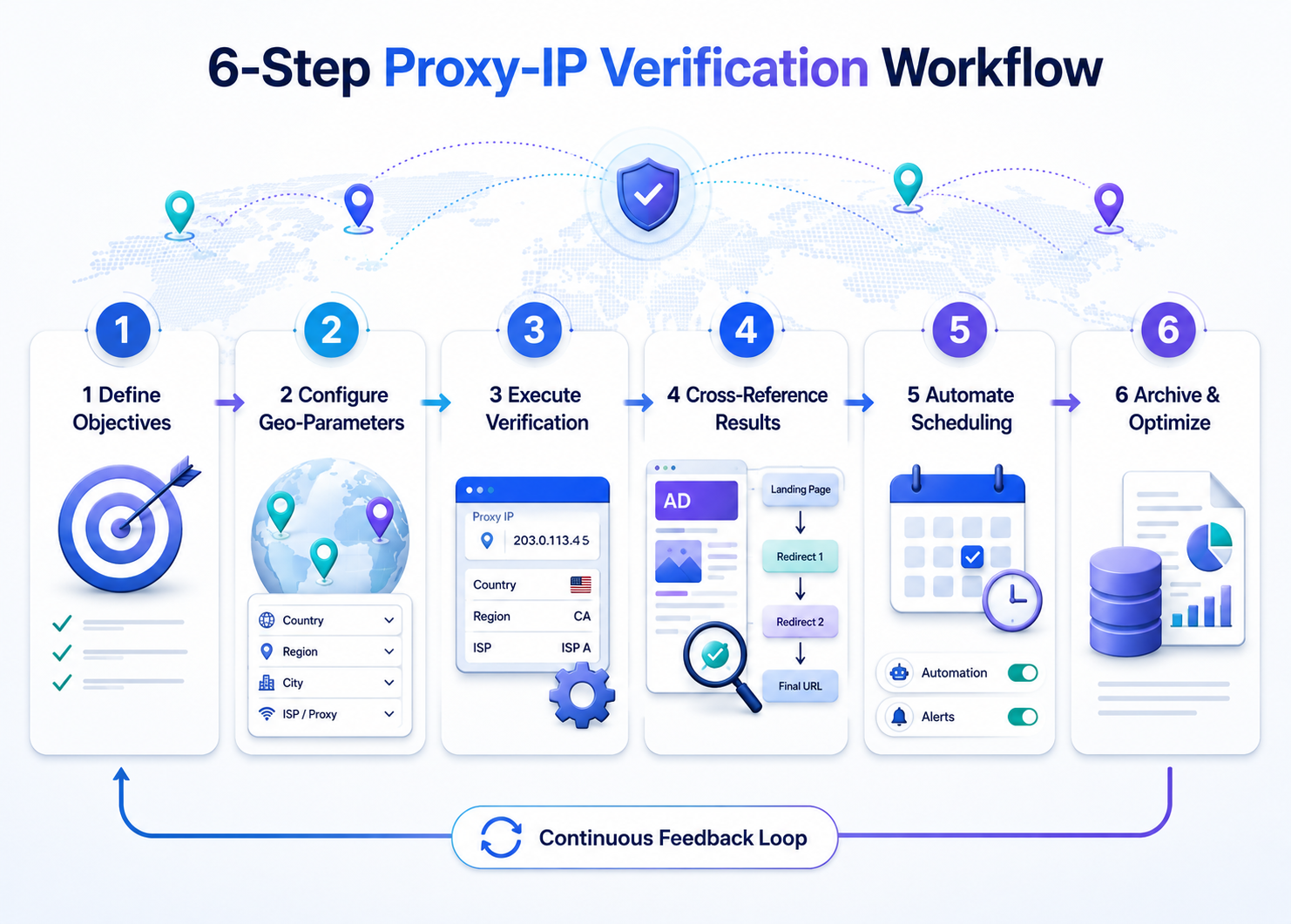
Step 4: Cross-referencing results and flagging anomalies
Verification results need to be cross-referenced against ad platform back-end data to locate problems.
Cross-reference dimensions:
| Dimension | What proxy verification saw | What the dashboard shows | Anomaly criterion |
|---|---|---|---|
| Ad impression | No ad shown in the target market | Dashboard shows impressions in that market | Anomaly: possible geo-targeting drift or invalid impressions |
| Creative content | English creative displayed | Delivery was set to Japanese creative | Anomaly: localization config error |
| Landing page | Redirects to wrong site / 404 | Dashboard shows normal clicks | Anomaly: chain config error — click budget wasted |
| Response time | Landing page takes 5+ seconds to load | Dashboard doesn't track this | Anomaly: possible CDN config issue in that market |
| Competitor ad slot | Competitor ad appears on same keyword/slot | Dashboard doesn't track this | Intel: bid strategy needs review |
Step 5: Automated verification task scheduling
Manual one-by-one verification can't cover the combinatorial space of markets × ad groups × time windows. Ad monitoring needs automation.
Core automation logic:
Scheduled task (daily / every 4 hours)
  → Read verification task list (market × ad group × verification type)
  → Assign a proxy IP from the matching geo to each task
  → Execute verification request + screenshot + data capture
  → Write results to the database
  → Anomalies trigger alerts (email / chat)
  → Generate daily / weekly reports
Key automation parameters:
| Parameter | Recommended value | Why |
|---|---|---|
| Proxy IP rotation per verification | At least 3 distinct IPs per market | Avoid single-IP result bias |
| Request interval | 5–15 seconds | Simulate real user browsing pace; too fast triggers rate controls |
| Screenshot resolution | 1920×1080 (desktop) or 375×812 (mobile) | Match the rendering of real devices |
| Retry policy | On failure, retry after 30s, up to 3 times | Rule out network-jitter false positives |
| Result retention | At least 90 days | For dispute evidence and trend analysis |
Step 6: Result archival and the delivery-optimization feedback loop
The point of verification isn't "take a look, looks fine, done" — it's a data-driven delivery-optimization feedback loop.
Archive contents at minimum: verification timestamp, target market, proxy IP geo used, ad screenshot, landing page screenshot, redirect chain log, anomaly flags, resolution status.
Feedback loop paths:
- Geo-targeting drift → adjust the ad platform's targeting settings, exclude non-target regions
- Creative localization failure → fix creative config, re-verify after redelivery
- Landing page chain breakage → fix the redirect config, verify chain integrity across all target markets
- High invalid traffic share → adjust bid strategy, exclude anomalous traffic sources, enable the ad platform's traffic-quality filtering
Four common pitfalls in proxy IP configuration
| Pitfall | What's wrong | Fix |
|---|---|---|
| Geo and browser environment out of sync | Proxy switched to US, but browser timezone is still UTC+8 and language still zh-CN — fingerprint detection catches the inconsistency and returns "safe mode" content | Sync the browser timezone, language, and screen resolution every time you switch proxy IP |
| Using datacenter IPs for precision verification | Datacenter IP ranges are public; ad platforms have dedicated detection logic — impression rate drops 40%–60% vs residential | Use residential proxy IPs for precision verification |
| Verification frequency too high | A single IP making many requests in a short window triggers rate controls — subsequent requests get limited or return anomalies | Per-IP request interval ≥5 seconds; rotate 3+ IPs per market |
| Skipping mobile verification | Cross-border e-commerce mobile share exceeds 60% in most markets; desktop-only verification misses mobile-specific ad formats and rendering differences | Use mobile proxy IPs + mobile-device User-Agent |
The ROI logic of ad verification
Industry data puts search ad click fraud rate at 14%–22%; for small businesses, the share of ad budget consumed by invalid clicks can reach 30%. A team with a $100K/month ad budget, at a conservative 15% invalid traffic rate, wastes $15K/month. Systematic ad verification costs far less than that — once monthly budget exceeds $50K, verification investment typically pays back within 1–2 months through reduced invalid spend.
Coverage matters more than depth
Back to the original judgment: cross-border ad verification can't be done with "platform dashboard + manual spot checks." Platform dashboards tell you "the money went out"; proxy IP verification tells you "the money went to the right place."
In ad monitoring, verification coverage (how many markets × ad groups × time windows) matters more than per-run verification depth. No matter how detailed the verification on one market, if the other 4 markets aren't verified at all, the budget waste still happens. Get the baseline verification running across all delivery markets via automation first, then deepen detection granularity on priority markets — the ROI on this is higher than going maximum-depth on a single market.
Cross-border product sourcing decisions also depend on ad verification feedback — using proxy IPs to verify competitor ad delivery in different markets (keywords, creatives, pricing strategies) provides real market-competition intel for sourcing decisions.
FAQ
Q1: Does ad verification have to use residential proxy IPs? Are datacenter IPs unusable?
Not unusable, but the precision difference is noticeable. Residential proxy IPs come from real home addresses assigned by ISPs; ad platforms treat them as ordinary users. Datacenter IP ranges are public, and some ad platforms identify them and return different content. For large-batch URL sampling, datacenter IPs work and are more efficient; for verifying geo-targeting precision and creative rendering accuracy, residential proxy IPs are recommended.
Q2: Do you need to log into the ad platform account during verification?
No, and not recommended. Ad verification simulates ordinary user browsing — what you're verifying is "what target-region users see in the logged-out state." Once logged in, the ad platform may adjust display content based on the account's history, distorting verification results.
Q3: How many proxy IPs are enough to verify one market?
At least 3 distinct IPs per market per verification run. Single-IP results may be influenced by that IP's history or subnet reputation; taking the intersection of 3+ IP results removes individual bias. For priority markets (>20% budget share), increase to 5–10 IPs.
Q4: Does proxy IP response speed affect ad verification?
Indirectly, yes. If proxy IP response latency exceeds 2–3 seconds, the ad creative may not have fully loaded by the time the screenshot fires, producing false-positive "ad not shown" results. Pick proxy IPs with nodes in the target market to minimize trans-oceanic latency. Residential proxy IPs typically respond in 200–800ms, sufficient for most ad verification scenarios.
Q5: How do you tell whether invalid traffic comes from botnets or real users?
Proxy IP verification alone can't directly tell — but cross-referencing surfaces anomalies. If proxy verification confirms the ad is delivered but the platform's dashboard shows abnormally high click rate (2x+ industry average) and extremely low conversion rate (50%+ below average) for that market, the "high-click-low-conversion" pattern is the classic signature of invalid traffic. Industry data shows botnets account for close to 40% of click fraud.
Q6: Do cross-border e-commerce teams need a dedicated ad verification team?
Not necessarily. Small-to-mid teams can have ad operations staff cover it part-time alongside automation scripts to reduce manual cost. Once monthly ad budget exceeds $200K and delivery markets exceed 10, dedicate a person — verification's market × ad group × time window combinatorial space grows fast, and coverage degrades under a part-time model.
Q7: Can ad verification results be used as evidence for refund requests to the ad platform?
Some ad platforms accept third-party verification data as supporting evidence for invalid-click refunds. Preserve the full evidence chain: proxy IP geo info, verification timestamps, ad screenshots, redirect chain logs, comparison with dashboard data. Whether refunds are granted depends on the platform's policy and review process.