What's the Difference Between Residential and Datacenter Proxies in Terms of Integration?
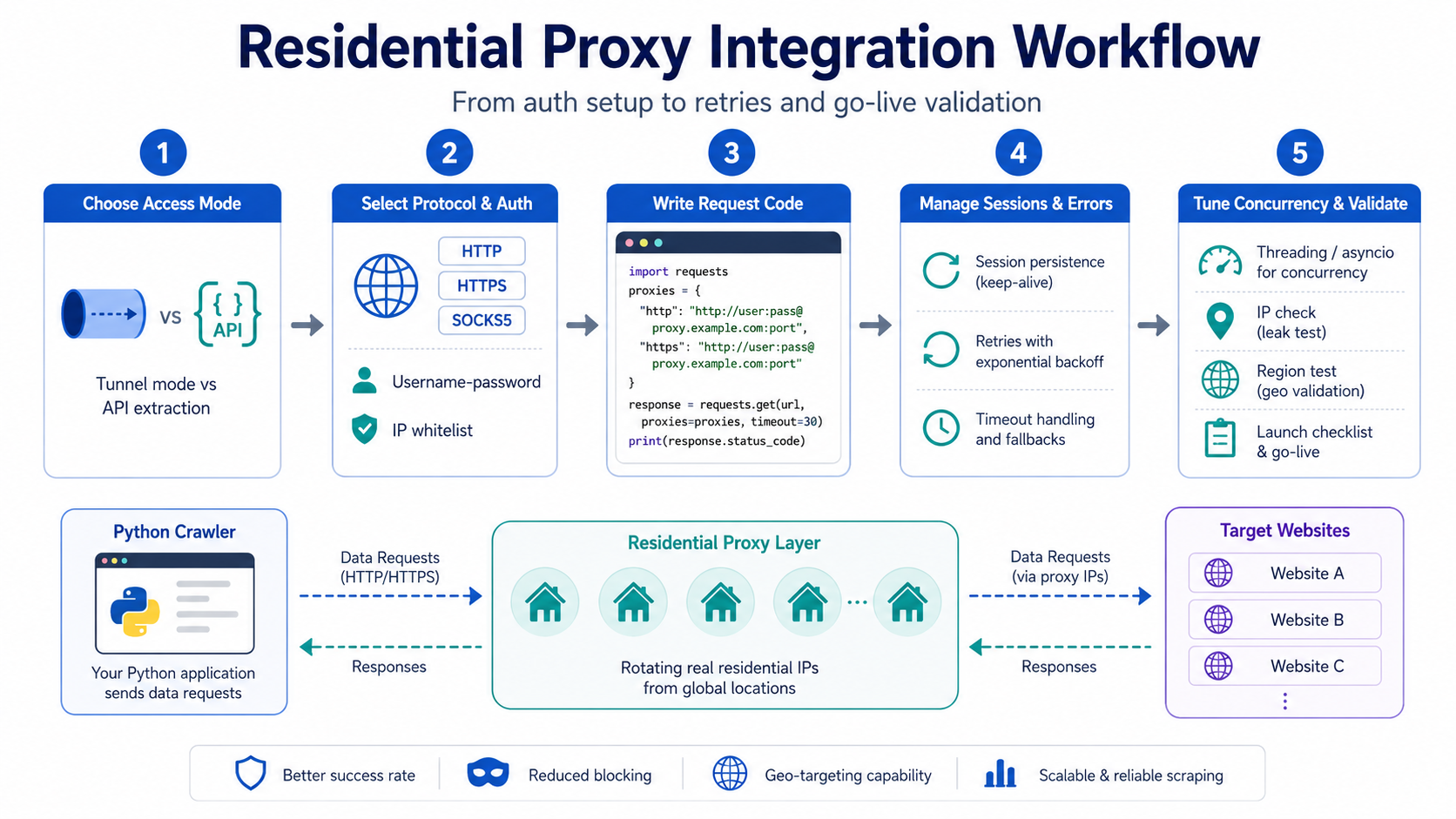
Residential proxies and datacenter proxies differ fundamentally in how they're integrated — this needs to be clear before you write any code.
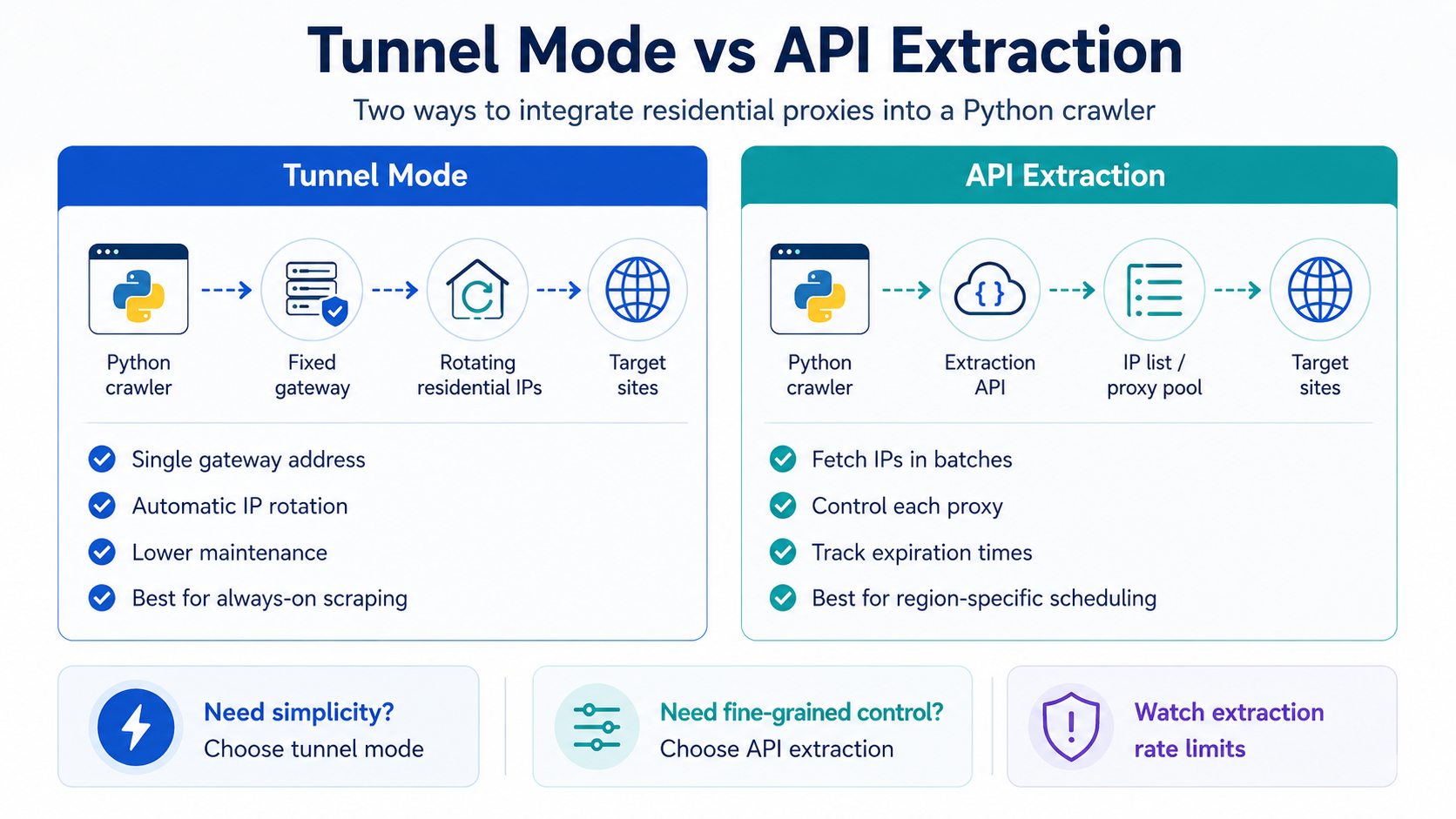
Datacenter proxies usually come as a fixed list of IPs you can drop into your code and rotate. Residential proxies are different: the IP resources come from real home broadband networks, and the IP addresses change dynamically. Providers therefore typically offer two integration shapes:
| Integration Mode | How It Works | Best For |
|---|---|---|
| Tunnel (backconnect) mode | Requests go to a fixed gateway address; the server-side automatically allocates and rotates IPs | Continuous collection tasks where you don't want to maintain an IP pool and want automatic IP rotation |
| API extraction mode | First call an API to fetch a batch of IPs, then plug each into your code as needed | Tasks where you need precise control over which IP each request uses, or where IP lifetime matters |
Take public-opinion monitoring as an example: it needs to continuously and frequently scrape multiple news source pages. Tunnel mode eliminates IP pool maintenance overhead and fits this "always running" task profile well. For general-purpose web scraper scenarios where you need to assign different regional IPs to different target sites, the IP list returned by API extraction mode allows finer-grained scheduling.
Before coding, confirm which integration shape your provider offers, then decide your code structure. The two modes' configuration logic differs completely — pick wrong and you'll be rewriting later.
How to Write Python Code for Tunnel Mode?
Tunnel mode is the default integration approach for most residential proxy providers, and configuration is relatively simple. There are three core elements: gateway address, port number, and authentication info.
Step 1: Get the Integration Parameters
Log into your proxy provider's console and find the tunnel proxy access info, which typically includes:
| Parameter | Example | Description |
|---|---|---|
| Gateway address | proxy.example.com | The proxy gateway domain or IP provided by the vendor |
| Port | 2000 | HTTP/HTTPS port; SOCKS5 port may differ |
| Username | user_abc | Auth username |
| Password | pass_xyz | Auth password |
Some providers support IP whitelist authentication — after adding your server's IP to the whitelist, no username/password is needed; you can connect directly. The choice between the two auth methods:
| Auth Method | Pros | Cons | Recommended For |
|---|---|---|---|
| Username/password | Unaffected by changes to the deployment machine's IP | Password leakage risk must be managed | Multi-machine deployment, containerized environments, cloud servers with non-fixed IPs |
| IP whitelist | No need to store credentials in code | Whitelist needs updating when machine IP changes | Self-managed facilities with fixed IPs; environments with high security requirements that disallow passwords in code |
Step 2: Write the Base Request Code
Using the requests library, here's the complete code for username/password auth:
import requests

# Proxy gateway configuration
proxy_host = "proxy.example.com"
proxy_port = 2000
proxy_user = "user_abc"
proxy_pass = "pass_xyz"

# Build the proxy URL
proxy_url = f"http://{proxy_user}:{proxy_pass}@{proxy_host}:{proxy_port}"

proxies = {
    "http": proxy_url,
    "https": proxy_url,
}

# Send request
response = requests.get(
    "https://httpbin.org/ip",
    proxies=proxies,
    timeout=15,
)
print(response.json())
If using the SOCKS5 protocol, install the pysocks dependency first:
pip install requests[socks]Then change the proxy URL prefix to socks5h://:
proxy_url = f"socks5h://{proxy_user}:{proxy_pass}@{proxy_host}:{proxy_port}"Note the difference between socks5h and socks5: socks5h hands DNS resolution to the proxy server, preventing DNS leakage where the target site sees your real exit address. For scraping tasks, always use socks5h.
How to Integrate API Extraction Mode?
API extraction mode has one extra step compared to tunnel mode: you first call an API to get an IP list, then plug the IPs into requests.
Step 1: Call the Extraction API
Providers typically expose a REST interface that takes parameters like quantity, region, and protocol, and returns an IP list. A typical call:
import requests

# Extraction API URL (generic format; refer to your vendor's docs)
extract_url = "https://api.example.com/getip"
params = {
    "num": 10,          # Extract 10 IPs at a time
    "protocol": "http", # Protocol type
    "region": "random", # Region; "random" picks randomly
    "format": "json",   # Return format
}

resp = requests.get(extract_url, params=params, timeout=10)
ip_list = resp.json().get("data", [])
# ip_list format is typically [{"ip": "1.2.3.4", "port": 8080, "expire": "2026-06-22 12:30:00"}, ...]
Step 2: Build a Usable Proxy Pool
Extracted IPs have a lifetime limit. Dumping them all in for rotation will result in lots of timeouts. You need to do two things: track each IP's expiration time, and proactively remove them before they expire.
import time
from datetime import datetime

class ProxyPool:
    def __init__(self):
        self.pool = []

    def add(self, ip_info_list):
        for item in ip_info_list:
            expire_time = datetime.strptime(item["expire"], "%Y-%m-%d %H:%M:%S")
            self.pool.append({
                "proxy": f"http://{item['ip']}:{item['port']}",
                "expire": expire_time,
            })

    def get_one(self):
        # Remove expired IPs
        now = datetime.now()
        self.pool = [p for p in self.pool if p["expire"] > now]
        if not self.pool:
            return None
        return self.pool.pop(0)["proxy"]
Step 3: Use in Requests
pool = ProxyPool()
pool.add(ip_list)

proxy_addr = pool.get_one()
if proxy_addr:
    response = requests.get(
        "https://target-site.com/data",
        proxies={"http": proxy_addr, "https": proxy_addr},
        timeout=15,
    )
Key caveat for API extraction mode: the extraction frequency can't be too high. Most providers impose a call interval on the extraction API, typically 1–5 seconds. Hitting it rapidly will trigger rate limiting and return empty lists or errors. Add an extraction interval timer in your code and wait when below the minimum interval.
How to Handle Session Persistence and IP Rotation?
Residential proxy IP rotation strategy directly affects scraping success rate, and different tasks have very different session persistence needs.
Scenarios Needing Session Persistence
Some scraping tasks need the same IP to complete multi-step operations — visit the list page, paginate, then enter the detail page. If every request gets a different IP, the target site will flag this as abnormal access.
In tunnel mode, mainstream providers support persisting the same exit IP by appending a session parameter to the username:
import requests

# Append a session identifier to the username; identical session values map to the same IP
session_id = "session_abc123"
proxy_user_with_session = f"user_abc-session-{session_id}"
proxy_url = f"http://{proxy_user_with_session}:{proxy_pass}@{proxy_host}:{proxy_port}"

proxies = {"http": proxy_url, "https": proxy_url}

# Multiple requests with the same session_id will route through the same exit IP
for page in range(1, 6):
    resp = requests.get(
        f"https://target-site.com/list?page={page}",
        proxies=proxies,
        timeout=15,
    )
Session lifetime depends on the provider's settings and the IP's own lifecycle, typically 1–30 minutes. After lifetime expiry, even the same session identifier gets assigned a new IP.
Scenarios Needing High-Frequency Rotation
Tasks like public-opinion monitoring that need to scrape many different pages in a short period actually need a different IP for every request. In tunnel mode, just omit the session parameter — the server defaults to switching IPs on every request.
| Strategy | Implementation | Best For |
|---|---|---|
| Rotate IP per request | Tunnel mode without session param | Large-scale page scraping, public-opinion monitoring, ad monitoring |
| Fixed session | Append session identifier to username | Multi-step workflow scraping, tasks needing login state |
| Scheduled rotation | Change session identifier every N minutes | Long-running continuous scraping of the same site |
Code pattern for scheduled rotation:
import time
import uuid

def get_rotating_session(interval_seconds=300):
    """Generate a new session identifier every interval_seconds"""
    current_slot = int(time.time()) // interval_seconds
    return f"rotate_{current_slot}"

# In use
session_id = get_rotating_session(interval_seconds=300)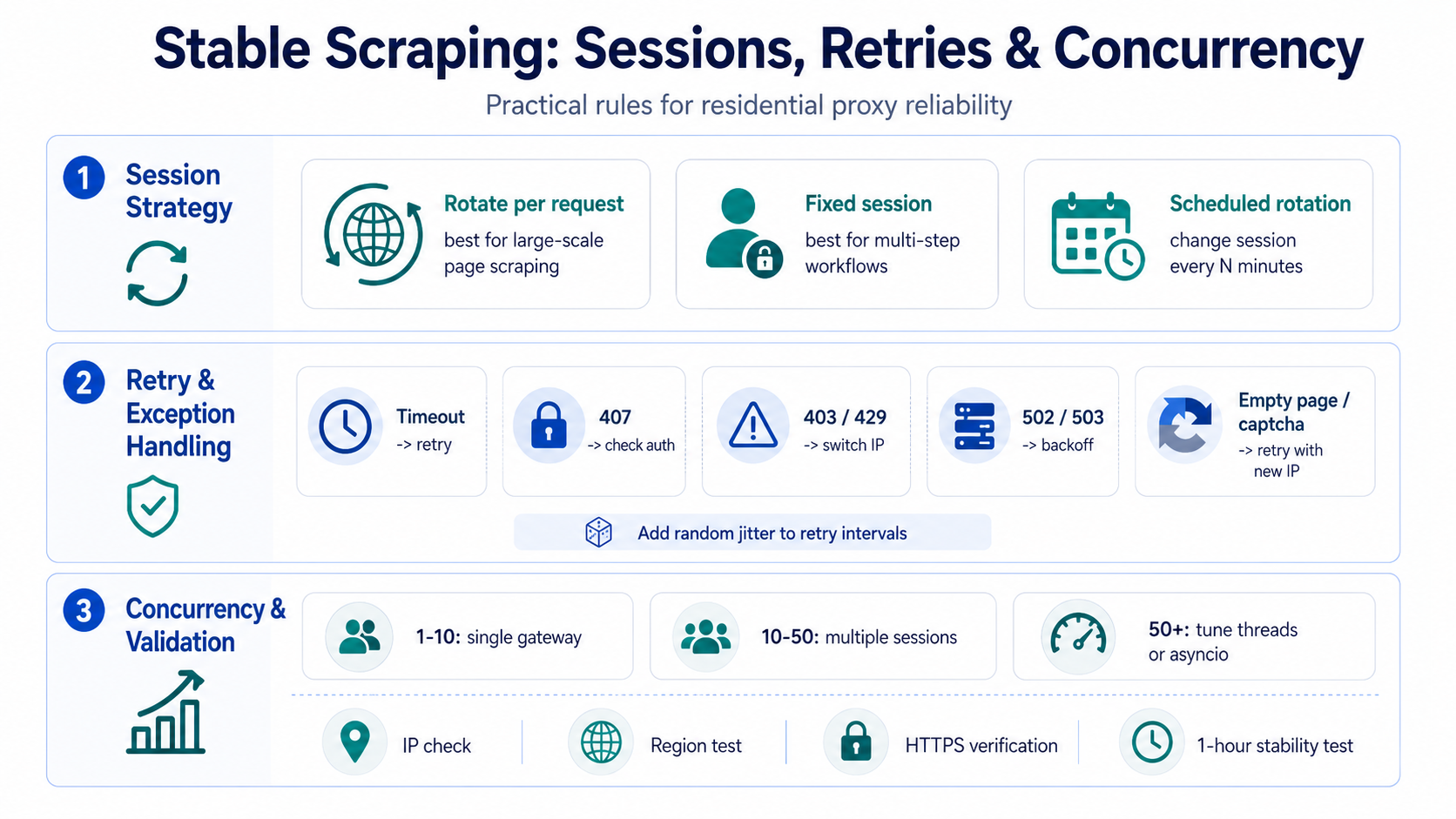
How to Design Exception Handling and Retry Mechanisms?
Residential proxy IP quality fluctuates more than datacenter proxies. Exception handling isn't "icing on the cake" — it's a production requirement.
Common Exception Types
| Exception Type | Symptom | Cause | How to Handle |
|---|---|---|---|
| Connection timeout | ConnectionTimeout | IP has expired or gateway is overloaded | Retry, switch IP |
| Proxy auth failure | HTTP 407 | Wrong username/password or account in arrears | Check auth info; do not retry |
| Target site limiting | HTTP 403/429 | Current IP flagged by target site | Switch IP and retry |
| Proxy gateway error | HTTP 502/503 | Provider gateway anomaly | Retry after delay |
| Content validation failure | Empty page or captcha returned | IP quality issue | Switch IP and retry |
Wrapping Requests with Retry
import requests
import time
import random

def fetch_with_proxy(url, proxies, max_retries=3, timeout=15):
    """Proxy request with exception handling and retry"""
    for attempt in range(max_retries):
        try:
            resp = requests.get(url, proxies=proxies, timeout=timeout)

            # HTTP status code checks
            if resp.status_code == 407:
                raise Exception("Proxy auth failed; check credentials")
            if resp.status_code in (403, 429):
                print(f"Attempt {attempt+1} blocked by target site, switching IP and retrying")
                time.sleep(random.uniform(2, 5))
                continue
            if resp.status_code in (502, 503):
                print(f"Proxy gateway anomaly, retrying in {3*(attempt+1)}s")
                time.sleep(3 * (attempt + 1))
                continue

            # Content validation: check if response is empty or shows captcha signs
            if len(resp.text) < 100:
                print("Response too short, suspected empty page, retrying")
                continue

            return resp

        except requests.exceptions.ConnectTimeout:
            print(f"Attempt {attempt+1} connection timed out, retrying")
            time.sleep(random.uniform(1, 3))
        except requests.exceptions.ProxyError:
            print("Proxy connection failed, retrying")
            time.sleep(random.uniform(1, 3))

    return None  # All retries failed
Critical detail: retry intervals need random jitter. Fixed intervals create "peaks" — multiple tasks retrying at the same moment worsen congestion. Random delays like random.uniform(1, 3) are the standard engineering approach.
What Should You Watch Out for When Configuring Proxies for Concurrent Scraping?
Single-threaded sequential requests are too slow for production. Python commonly uses concurrent.futures or the async framework aiohttp for concurrency, but proxy configuration in concurrent scenarios has several common pitfalls.
Relationship Between Concurrency and Proxy Bandwidth
Residential proxy bandwidth is limited by real home networks. Per-IP bandwidth is usually much lower than datacenter proxies. Higher concurrency isn't always better — excessive concurrency causes massive timeouts.
| Concurrency Scale | Recommended Config | Notes |
|---|---|---|
| 1–10 concurrent | Single tunnel gateway is fine | No special handling needed |
| 10–50 concurrent | Distribute across multiple sessions | Use different session IDs per worker thread |
| 50–200 concurrent | Rotate across multiple gateway addresses | Confirm gateway concurrency cap with provider |
| 200+ concurrent | Evaluate upgrading the plan or adding more channels | Single gateways typically have concurrency caps |
Multi-threading Code Example
from concurrent.futures import ThreadPoolExecutor, as_completed
import requests
import uuid

def create_proxy_url(session_id=None):
    """Create an independent proxy URL for each thread"""
    user = proxy_user
    if session_id:
        user = f"{proxy_user}-session-{session_id}"
    return f"http://{user}:{proxy_pass}@{proxy_host}:{proxy_port}"

def fetch_page(url):
    """Single-page scraping task"""
    session_id = str(uuid.uuid4())[:8]
    proxy_url = create_proxy_url(session_id)
    proxies = {"http": proxy_url, "https": proxy_url}
    return fetch_with_proxy(url, proxies)

# URLs to scrape
urls = [f"https://target-site.com/page/{i}" for i in range(100)]

# Cap concurrency at 20
with ThreadPoolExecutor(max_workers=20) as executor:
    futures = {executor.submit(fetch_page, url): url for url in urls}
    for future in as_completed(futures):
        url = futures[future]
        result = future.result()
        if result:
            print(f"Success: {url}, length: {len(result.text)}")
        else:
            print(f"Failed: {url}")
Async Approach
For concurrency above 50, aiohttp + asyncio is more efficient than multi-threading:
import aiohttp
import asyncio

async def fetch_async(session, url, proxy_url):
    try:
        async with session.get(url, proxy=proxy_url, timeout=aiohttp.ClientTimeout(total=15)) as resp:
            if resp.status == 200:
                return await resp.text()
    except Exception as e:
        print(f"Request failed: {e}")
    return None

async def main(urls):
    proxy_url = f"http://{proxy_user}:{proxy_pass}@{proxy_host}:{proxy_port}"
    connector = aiohttp.TCPConnector(limit=50)  # Cap underlying TCP connections
    async with aiohttp.ClientSession(connector=connector) as session:
        tasks = [fetch_async(session, url, proxy_url) for url in urls]
        results = await asyncio.gather(*tasks)
        return results

urls = [f"https://target-site.com/page/{i}" for i in range(200)]
results = asyncio.run(main(urls))
Note the TCPConnector(limit=50) parameter: it caps the underlying TCP connection count, not the coroutine count. Even with 200 coroutines created, simultaneous connections won't exceed 50. Set this value according to your proxy plan's concurrency limit.
What Needs to Be Validated Before Going Live?
Code written ≠ ready to ship. Here's a minimum pre-launch validation checklist:
| Validation Item | Method | Pass Criterion |
|---|---|---|
| Exit IP validation | Request httpbin.org/ip, check whether the returned IP is the proxy IP | Returned IP is not the server's real exit IP |
| Protocol validation | Test HTTP and HTTPS targets separately | Both protocols return normally |
| Auth validation | Deliberately use wrong password; confirm 407 is returned instead of pass-through | Bad credentials don't pass through |
| Timeout behavior | Set timeout to 1 second; observe timeout rate | Timeout exceptions caught correctly; main flow not blocked |
| Region validation | Request an IP geolocation API | Returned region matches configured region parameter |
| Concurrency validation | Run at target concurrency for 5 minutes | Success rate above 90%, no memory leaks |
| Long-running test | Run continuously for 1 hour | No connection leaks, no zombie threads |
One easily overlooked pitfall: HTTPS request certificate validation. Some proxy gateways use MITM-style handling for HTTPS traffic. If Python's requests has SSL cert validation enabled, you may get SSLError. Don't simply disable cert validation in production — confirm the provider's HTTPS handling and decide accordingly:
# Not recommended (disables verification)
response = requests.get(url, proxies=proxies, verify=False)

# Recommended: confirm whether the provider supports CONNECT tunneling
# Under CONNECT tunneling, HTTPS traffic is end-to-end encrypted; cert verification doesn't need to be disabled
Providers supporting CONNECT tunneling route HTTPS requests through an end-to-end encrypted channel — the proxy only forwards encrypted traffic without decrypting it. Under this mode, verify=True won't error and is the more secure choice.
FAQ
Q: At the Python code level, how does integrating residential proxy IPs differ from datacenter proxies?
The biggest difference is IP management. Datacenter proxies usually give you a fixed list of IPs — write a rotation routine and you're done. Residential proxy IPs are dynamically allocated, so you either use tunnel mode (let the server manage allocation) or API extraction mode (maintain your own IP pool with expiration tracking). Code complexity is a notch higher than datacenter proxies, but in exchange you get an access environment closer to a real user.
Q: Tunnel mode or API extraction mode — which should I pick?
Depends on task characteristics. Continuously running tasks where you don't need to precisely control each request's exit IP fit tunnel mode — easier maintenance. Tasks that need region-specific IP allocation or pre-validation of IP availability fit API extraction mode — more flexible, higher maintenance cost. For general-purpose web scraping, tunnel mode covers most needs.
Q: Why am I still getting blocked by the target site even though I'm using proxy IPs?
Three common causes. First, request headers aren't complete — fields like User-Agent and Accept-Language are missing or static, and the target site identifies you by header fingerprint. Second, request frequency is too high — even with IP rotation, sending many requests to the same site in a short window triggers rate limiting. Third, the IP itself is already flagged — residential proxy IP pools do contain some IPs that were previously used at high frequency; retrying with a different batch usually solves it.
Q: What's the right concurrency level?
No universal answer — depends on the proxy plan's concurrency limit and the target site's tolerance. Start with 10–20 concurrency, observe success rate and response time, and adjust upward gradually. If success rate drops below 85% or average response time exceeds 10 seconds, you've hit the ceiling. Also check whether your proxy plan has a concurrency limit — requests over the cap are rejected outright.
Q: SOCKS5 or HTTP — which is better for scraping?
HTTP covers the vast majority of web scraping scenarios, is simpler to configure, and easier to debug. SOCKS5 only has the edge when you need to proxy non-HTTP traffic — like WebSocket connections or FTP scraping. If your targets are all HTTP/HTTPS pages, HTTP is fine; no need to add SOCKS5's configuration complexity.
Q: What happens when a proxy IP's lifetime expires?
In tunnel mode, the server automatically switches to a new IP on expiration — no code impact. In API extraction mode, requests time out or throw connection errors after expiration. Your code needs to actively detect this, remove expired IPs from the pool, and refresh with new ones. So API extraction mode code must have IP expiration management — without it, scraping fails in batches after expiration.




