Why Does Ad Verification Need Precise Geographic Exits?
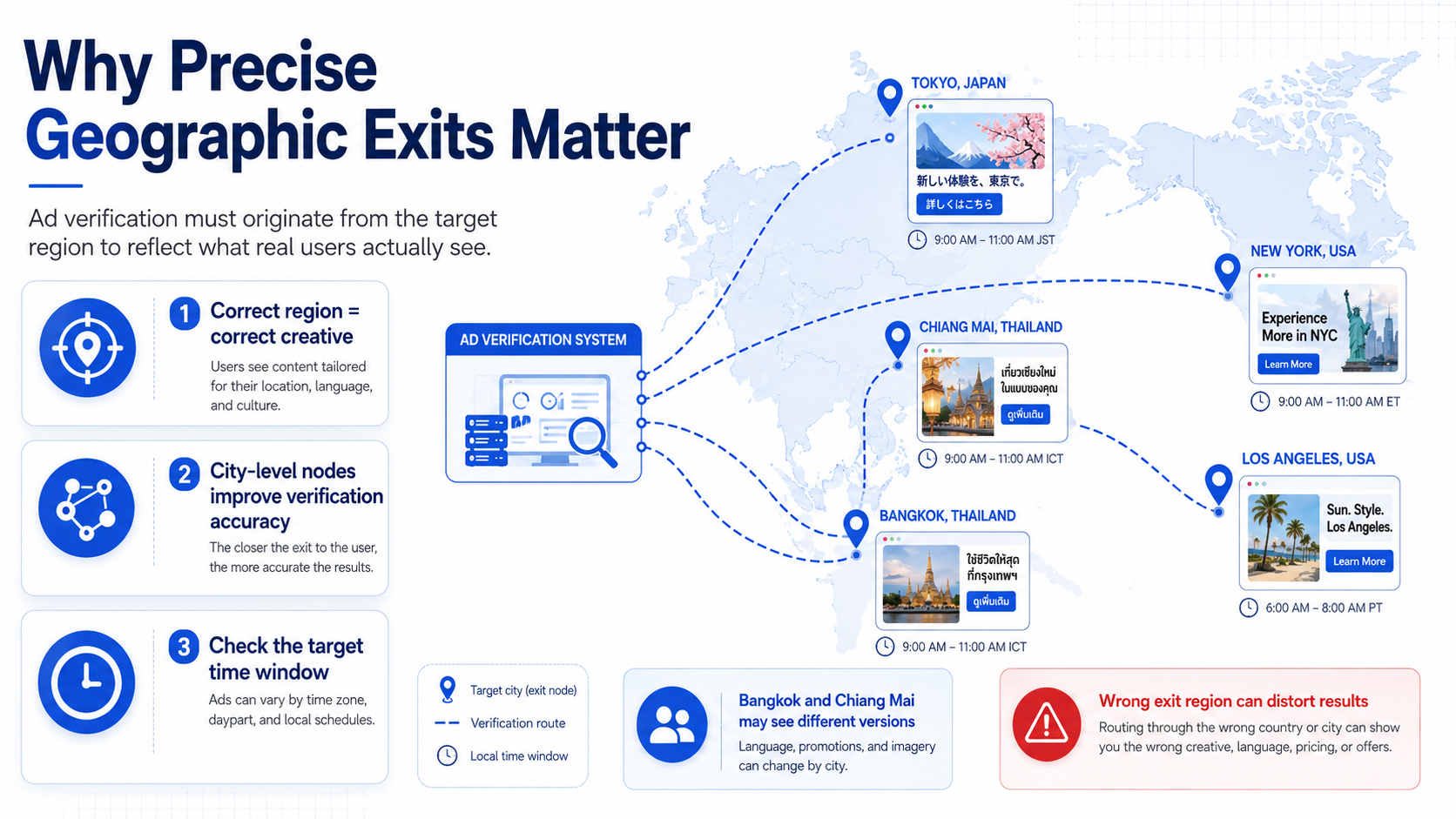
Ad campaigns are geo-targeted, so verification must also originate from the target region — otherwise the ad content seen won't match what real users see.
This is the most underestimated prerequisite in ad verification. Ad platform delivery systems decide which creative, which landing page version, and even which bidding strategy to serve based on the visitor's IP geolocation. If the verification request's exit IP isn't in the target region, the platform may return a default version or an entirely different ad — verification results are distorted at the source.
Industry research shows that globally, verification failures caused by geo-targeting deviation account for around [TBD]% of digital ads. A typical ad monitoring scenario: a cross-border e-commerce brand runs localized creatives in 5 Southeast Asian countries, but the verification team sends requests from a domestic exit and only sees the default English version — unable to confirm whether localized content went live correctly.
Ad monitoring typically requires geographic precision down to the city level. National-level exits can only verify "whether this country can see the ad," not "whether Bangkok and Chiang Mai see the same version." City-level node coverage directly determines verification granularity.
One often-overlooked point: time zones. Ad delivery usually follows dayparting strategies. Verification requests must not only originate from the right region but also fall within the target region's delivery window. Requests outside the window may trigger empty returns — not because the ad has a problem, but because it's not in its broadcast cycle.
How Much Do Residential vs. Datacenter IPs Affect Verification Results?
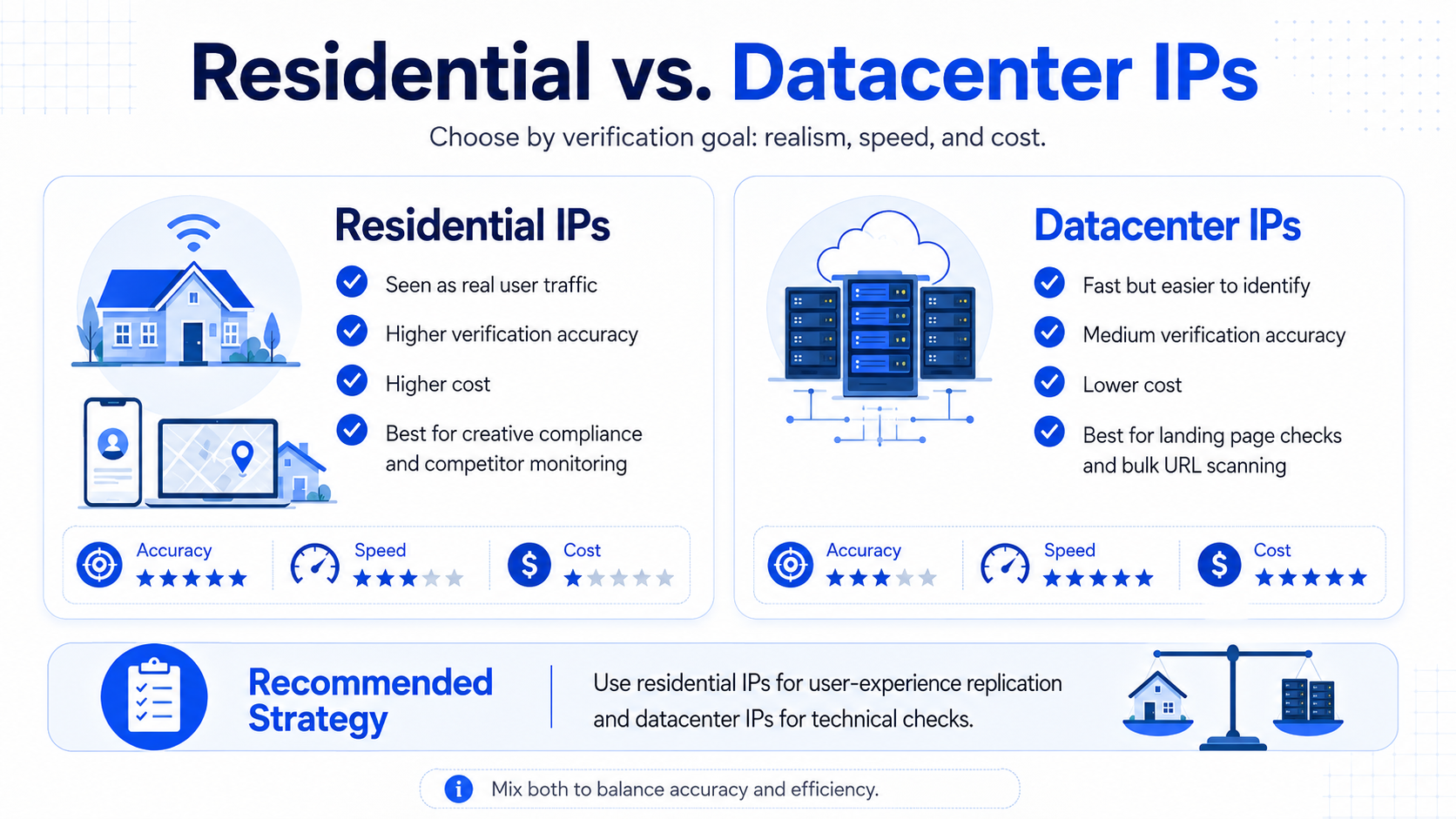
Residential IPs return verification results closer to what real users see; datacenter IPs are fast but easily identified as non-organic traffic by ad platforms.
The core difference between these two IP types in ad verification isn't speed — it's "how the platform perceives the request."
| Dimension | Residential IP | Datacenter IP |
|---|---|---|
| Source | Real IP ranges allocated to home/mobile users by carriers | IP ranges allocated by cloud providers / IDC facilities |
| Ad platform recognition | Treated as organic user traffic | May be flagged as bot traffic |
| Verification accuracy | High; ads match what real users see | Medium; some platforms return different content to datacenter IPs |
| Request cost | Higher; usually billed by traffic or request volume | Lower; usually billed by IP count or bandwidth |
| Best-fit verification type | Creative compliance verification, competitor ad monitoring, user experience replication | Landing page availability checks, link redirect verification, bulk URL scanning |
Third-party testing shows that on mainstream ad platforms, datacenter IPs see content differing from residential IPs by about [TBD]%. Differences concentrate in personalized recommendation ads and dynamic bidding ads; static creative ads are less affected.
In practice, we recommend tiered usage: residential IPs for verification tasks that replicate real user experience, datacenter IPs for purely technical link checks and page load tests. Mixing the two strikes a balance between accuracy and cost.
What Business Parameters Need to Be Defined Before Integration?
Four categories of parameters must be defined before integration — missing any of them leads to rework.
| Parameter Category | What to Define | Example |
|---|---|---|
| Geographic coverage | Countries, cities, required node count | US: New York, Los Angeles, Chicago; Japan: Tokyo, Osaka |
| Request scale | Daily request volume, peak concurrency, request chain length per verification | 50,000/day, peak concurrency 200, 3 redirects per verification |
| Protocol requirements | HTTP/HTTPS/SOCKS5, whether WebSocket is needed | HTTPS primarily; some video ad verifications need WebSocket |
| Verification cadence | One-off or continuous monitoring, polling interval | Continuous monitoring, polling every 30 minutes |
Estimating request scale
Number of target regions × verification frequency per region × request chain length per verification = daily request volume. For example, covering 10 cities, verifying once per hour per city, with 3 requests per verification: daily volume = 10 × 24 × 3 = 720 requests. That's just the baseline — competitor ad monitoring and creative compliance audits can multiply that figure by 5 to 10x.
Protocol selection rationale
HTTPS covers the vast majority of web ad verification scenarios. SOCKS5 is only necessary when handling non-HTTP protocol traffic, such as some in-app ad verifications. Confirm the target platform's interface protocol requirements before selecting.
How Does the 5-Step Integration Process Work?
The integration process centers on five steps: node matching, authentication configuration, request construction, frequency control, and result collection. Each step has a clear completion standard.
Step 1: Match proxy nodes to delivery regions
Working from the "country-city" list compiled earlier, match nodes one by one from the proxy provider's node inventory. Pay attention to three details during matching:
- Whether city-level nodes are actually available. Some providers label city coverage but actually only deliver country-level — verify by testing.
- Whether multiple IP ranges are available in the same city for rotation. Sustained requests from a single IP range get throttled easily.
- Whether actual node response latency is under 500ms. Ad platforms may return timeouts rather than ad content for slow requests.
Step 2: Complete authentication configuration
Two mainstream authentication methods:
| Auth Method | Configuration | Best For |
|---|---|---|
| Username + password | Pass Base64-encoded credentials in the Proxy-Authorization request header | Multiple machines sharing one account, flexible node switching |
| IP whitelist | Add verification server IPs to the provider's console whitelist | Fixed server deployments, enterprise environments with higher security requirements |
For enterprise deployments, IP whitelisting is recommended. Username/password is flexible but carries higher credential leakage risk, and adds an auth header to every request, increasing request size.
Step 3: Construct verification requests
The key difference between ad verification requests and ordinary data collection requests: you must simulate the browser environment of real users in the target region. Request headers need three critical fields:
- User-Agent: matching the mainstream browser version in the target region
- Accept-Language: matching the language setting in the target region
- Referer: simulating a referral source from a search engine or social platform
These three fields directly determine which content version the ad platform returns. A request originating from a US IP but with Accept-Language set to zh-CN may cause the ad platform to return content following Chinese-user logic — and verification results drift from reality.
Step 4: Configure request frequency control
Frequency control is the step where ad verification most often goes wrong. Requests that are too fast trigger the platform's rate-limiting mechanisms; too slow, and you can't cover enough verification volume.
| Verification Type | Recommended Request Interval | Per-IP Hourly Request Cap |
|---|---|---|
| Creative compliance verification | 10-15 sec/request | 240-360 |
| Competitor ad monitoring | 20-30 sec/request | 120-180 |
| Landing page redirect detection | 5-8 sec/request | 450-720 |
Once the per-IP cap is reached, automatically rotate to the next IP. We recommend a "use and discard" strategy: actively swap IPs once each one hits 80% of its cap, keeping a 20% buffer for retries on unexpected failures.
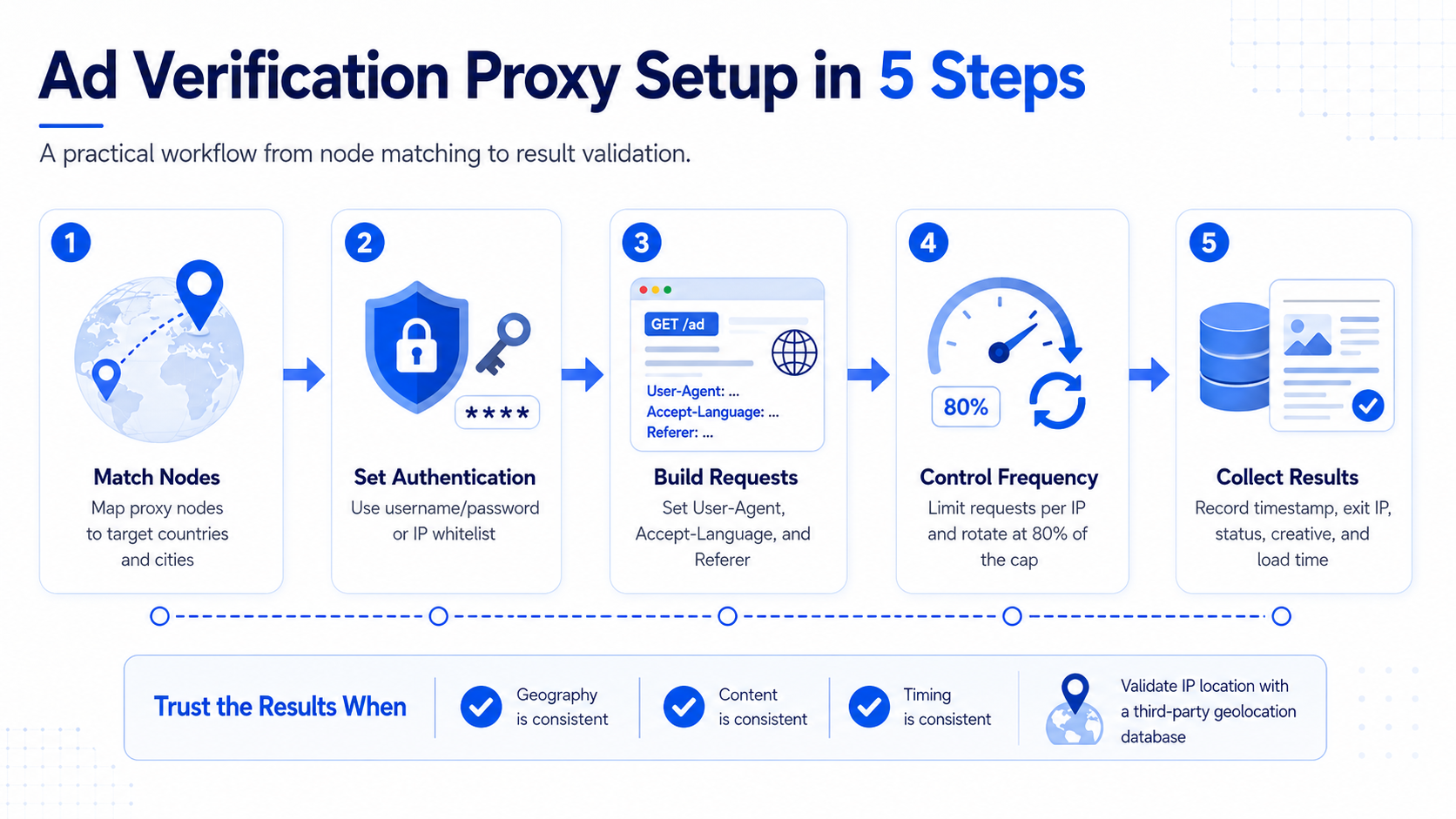
Step 5: Collect and archive verification results
Each verification request return needs five fields captured:
- Request timestamp
- Exit IP and its geographic location
- HTTP status code
- Returned ad creative identifier or landing page URL
- Page load completion time
These five fields form a complete verification record. Archive format recommendation: JSON or structured CSV, for easier cross-region comparative analysis later. Validate the exit IP's geographic location with a third-party IP geolocation database — don't rely solely on the location reported by the proxy provider.
How to Judge Whether Verification Results Are Trustworthy?
Trustworthy verification results must satisfy three conditions simultaneously: geographic consistency, content consistency, and time consistency.
Geographic consistency: The exit IP's actual geographic location matches the target delivery region. Cross-verify using third-party geolocation databases like MaxMind or IP2Location — nodes with match rates below 95% should be flagged as untrustworthy and swapped.
Content consistency: Multiple verification requests from the same region and time window should return broadly consistent ad content. If the same node returns 3 completely different creatives within 10 minutes, that IP may have been flagged by the platform — the content is random rather than the targeted delivery.
Time consistency: The verification request's timing falls within the ad delivery schedule. Verification results outside the delivery window only prove "the ad isn't running," not "the ad delivery has problems."
In practice, run at least 3 rounds of independent verification per task and use the consistent portion of results as the final conclusion. If 2 out of 3 rounds agree, the credibility is acceptable. If all 3 rounds differ completely, investigate IP quality or request configuration issues.
Which Configuration Details Are Common Pitfalls?
Three issues come up most frequently in ad verification projects.
DNS leaks
The proxy IP is configured correctly, but DNS requests don't go through the proxy channel — they resolve locally instead. Ad platforms check both IP geolocation and DNS resolution source, and a mismatch flags the request as anomalous traffic. The fix: enable remote DNS resolution in the proxy config so DNS requests also go out through the proxy node.
Cookie and session accumulation
Using the same browser configuration for verification over a long time accumulates cookies and session data, causing the ad platform to identify the verification request as a "returning user" rather than a "new user." Returned ad content may be the personalized version based on historical behavior, not the geo-targeted version. Clear cookies and sessions every time you switch verification regions.
SSL certificate validation failures
Some HTTPS proxies trigger certificate validation warnings when forwarding encrypted traffic. If the verification script has strict certificate validation configured, the request fails outright. Confirm whether the proxy provider supports SSL passthrough, and configure compatible certificate handling in the verification script.
Worth noting: this methodology doesn't apply to every ad platform. Some closed-ecosystem ad systems have their own verification SDKs or API interfaces — calling the official interface directly is more accurate and efficient than verifying externally via proxy IPs. Before integration, confirm whether the target platform provides official verification tools. If official tools exist, prefer them.
FAQ
Q: Must ad verification use residential IPs?
Not necessarily. Residential IPs suit creative compliance verification and competitor ad monitoring that need to replicate real user experience. If the verification target is landing page availability, link redirect logic, page load speed, or other purely technical metrics, datacenter IPs are sufficient and cheaper. Choose by verification type.
Q: How many verification requests can the same IP handle in succession?
Depends on the target platform's rate-limiting strategy. A conservative recommendation is no more than 200 requests per hour per IP, with active rotation at 80% of the cap. Some platforms sensitive to bot traffic have lower thresholds — adjust after testing.
Q: How can I tell whether a proxy IP's geolocation is accurate?
Don't just trust the location info the provider labels. Use third-party geolocation databases like MaxMind GeoIP2 or IP2Location for secondary validation, comparing the provider's labeled location against the third-party identification. Nodes with match rates below 95% aren't recommended for ad verification.
Q: What if verification requests get rate-limited by the ad platform?
Check three things first: whether request frequency exceeds the per-IP cap, whether critical request header fields are missing and causing bot identification, and whether DNS is leaking the real exit. If none of these are the issue and limiting persists, the current IP range has been flagged — switch to an unflagged range.
Q: Does ad verification need static IPs or rotating IPs?
Both, for different purposes. Static IPs suit long-running monitoring tasks on the same ad slot, maintaining exit consistency. Rotating IPs suit large-scale scans across many ad slots or competitor creatives, needing many non-repeating exits. Most ad verification projects use a hybrid.
Q: What's the difference between mobile and web ad verification?
The core differences are IP type and request environment. Mobile ad verification needs mobile carrier IP ranges, paired with mobile User-Agent and screen resolution parameters. Web verification uses residential or datacenter IPs with desktop browser environments. Some ad platforms run completely different delivery strategies on mobile vs. web — the two channels need separate verification.




