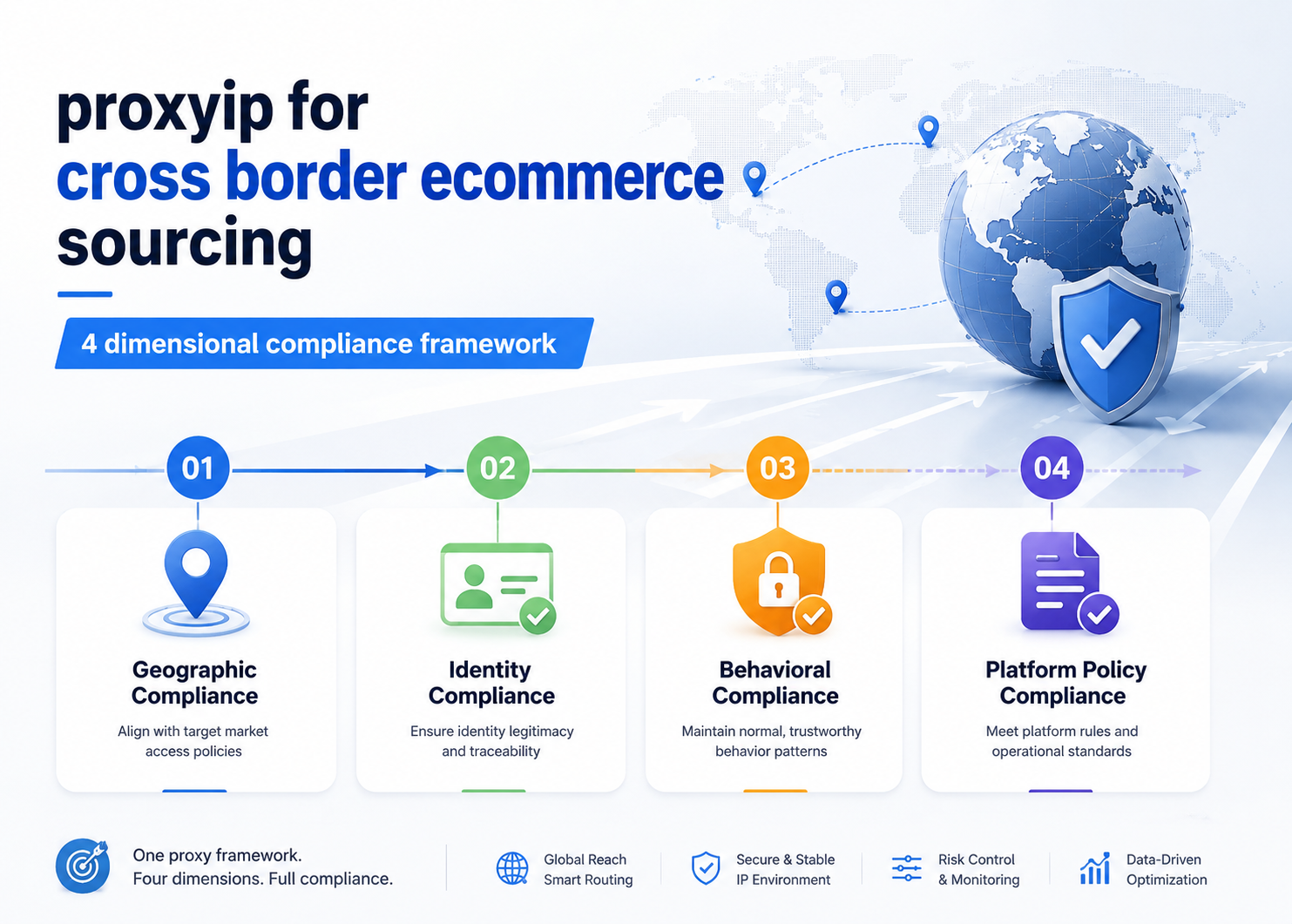
Issue 1: Wrong Network Environment — Connecting to an Overseas Proxy Node from a Domestic Network
The most common cause of overseas proxy IP connection failures has nothing to do with IP quality — the problem is the network environment itself.
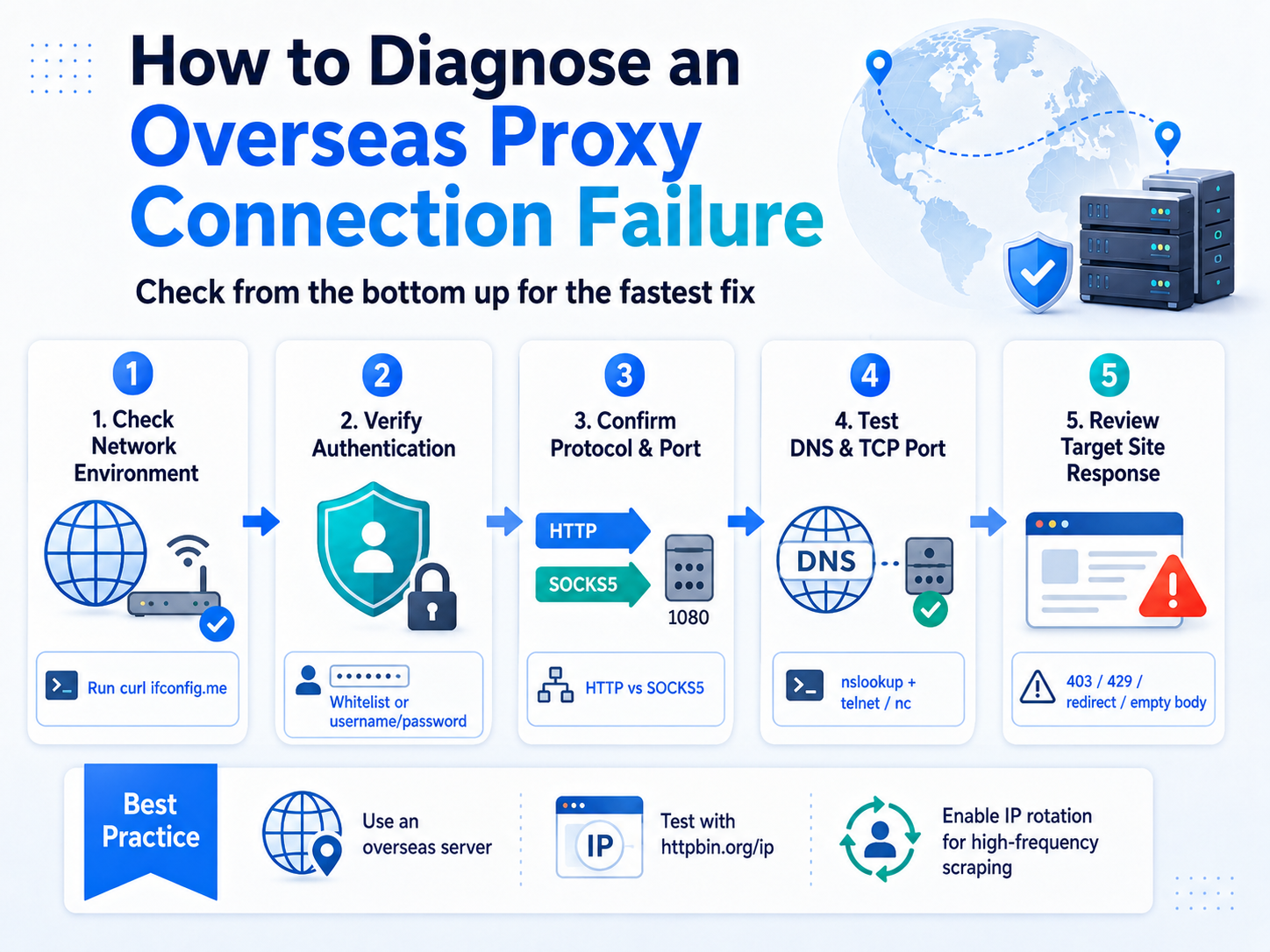
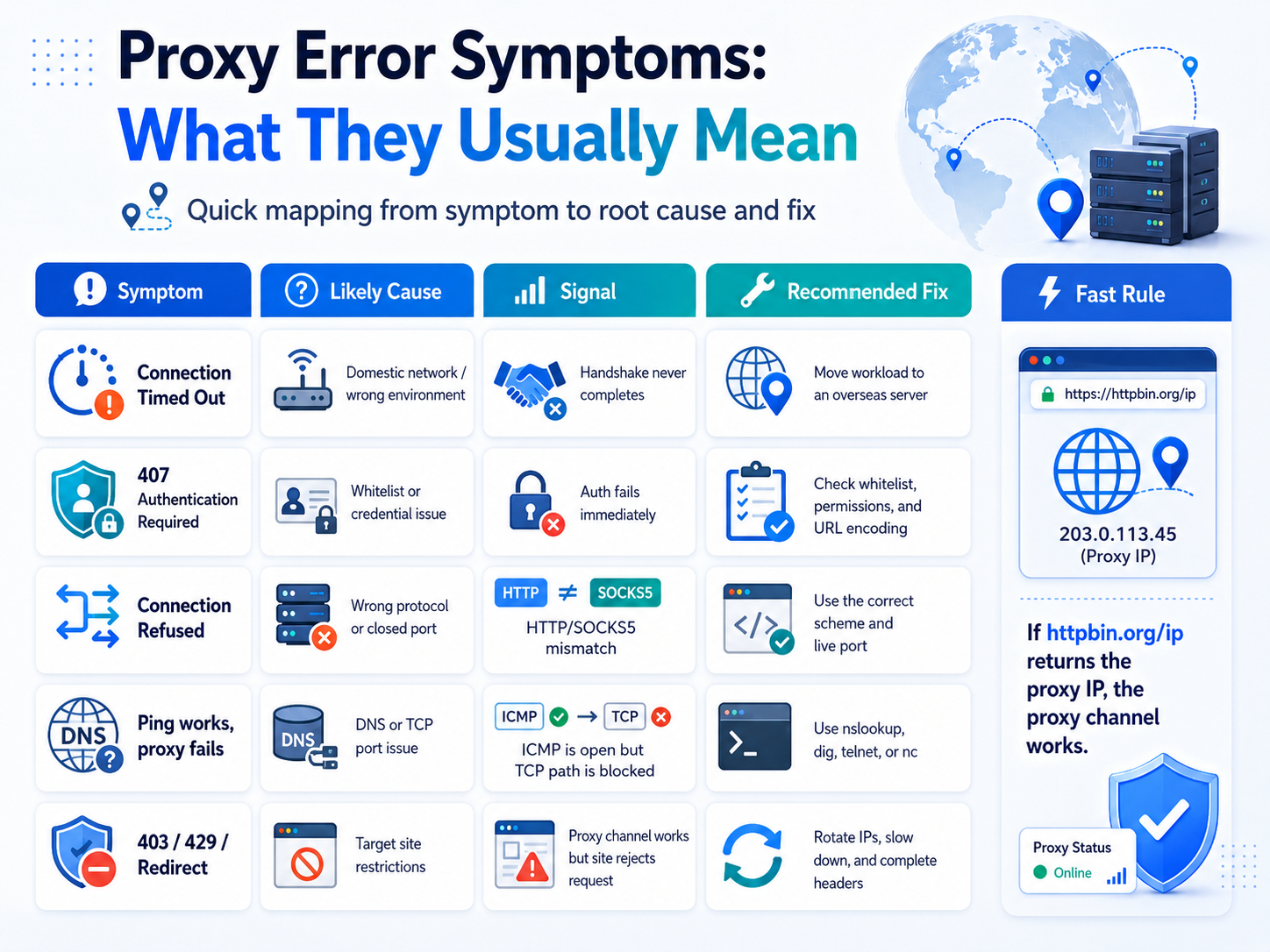
Core prerequisite: Overseas proxy IPs can only be used from an overseas network environment. If your device sits on a domestic (mainland China) network — including domestic VPS or cloud servers — a direct request to an overseas proxy node will fail at the TCP handshake stage, showing up as a timeout (Connection Timed Out) or a refusal (Connection Refused).
Many engineers get an overseas proxy API, run a connectivity test on their local dev machine, and conclude "this batch of IPs is bad" when it fails. In reality, deploying the same test script to AWS Tokyo, GCP Singapore, or another overseas node usually makes the exact same IPs work immediately.
Troubleshooting steps:
| Step | Action | Expected Result |
|---|---|---|
| 1 | Run curl ifconfig.me to check the outbound IP's geo-location | Confirm whether the requester is overseas |
| 2 | Outbound IP is domestic → move the scraping task to an overseas server | Re-test connectivity after switching |
| 3 | Outbound IP is already overseas but still can't connect → move on to Issue 2 | — |
Qingguo Network's overseas product line (Overseas Short-Term Proxy, Overseas Tunnel Proxy) covers 200+ popular countries and regions worldwide, with an IP pool in the tens of millions and unlimited concurrency — but all of that assumes the requester is on an overseas network.
Issue 2: Authentication Failure — Hidden Failures in Whitelists and Credentials
Once the network environment is confirmed, the second most frequent failure point is authentication. A 407 (Proxy Authentication Required) is the most direct signal, but in some scenarios authentication failures don't return 407 — the connection just drops.
Overseas proxy IPs generally support two authentication methods: IP whitelist and username/password. Each has a "hidden failure" mode that's easy to miss:
| Auth Method | Hidden Failure Cause | Frequency | How to Diagnose |
|---|---|---|---|
| IP whitelist | Cloud server reboot causes the outbound IP to shift; the whitelisted IP is no longer valid | High | Compare the whitelist against curl ifconfig.me |
| IP whitelist | Whitelist quota is full; new server IPs can't be added | Medium | Check remaining whitelist quota |
| Username/password | Password contains @, #, % or other special characters that get truncated during URL encoding | Medium | Test directly with curl -x to verify credential integrity |
| Username/password | Sub-account doesn't have permission for the overseas product line | Low | Check account permissions in the console |
Troubleshooting steps:
Use a minimal request to verify authentication:
# Username/password auth test
curl -x http://user:pass@proxy_host:port http://httpbin.org/ip

# Whitelist auth test (no credentials needed)
curl -x http://proxy_host:port http://httpbin.org/ip
If httpbin.org returns the proxy IP, authentication passed and the issue is downstream. If you get 407 or the connection drops, check credentials and whitelist configuration one by one.
Qingguo Network's overseas proxies support HTTP(S)/SOCKS5, with both IP whitelist and username/password authentication, including 256 free whitelist IP slots. For multi-server deployments where outbound IPs shift frequently, prefer username/password to avoid the maintenance cost of constantly updating the whitelist.
Issue 3: Wrong Protocol or Port — HTTP and SOCKS5 Are Not Interchangeable
Typical symptoms of protocol/port misconfiguration: the connection neither times out nor returns a standard error code — it's outright refused (Connection Refused) or returns a garbled response.
The root cause is that the HTTP proxy and SOCKS5 proxy handshake mechanisms are completely different. Using HTTP to connect to a SOCKS5 port (or vice versa) means the two ends can't align at the handshake stage, so the connection inevitably fails.
Three things to check:
| Check | Correct Approach | Common Mistake |
|---|---|---|
| Protocol type | The proxy scheme in your code matches what the provider gave you (http:// vs socks5://) | Copied a SOCKS5 port from the console but wrote http:// in the code |
| Port number | Pull the currently valid port from the console or API in real time | Hardcoded an old port number that's since been changed server-side |
| HTTPS targets | Client library supports the HTTP CONNECT tunnel method | Used HTTP forward-proxy mode against an HTTPS site, causing SSL handshake failure |
Troubleshooting:
# Test the same proxy address with HTTP and SOCKS5 separately
curl -x http://proxy_host:http_port http://httpbin.org/ip
curl -x socks5://proxy_host:socks_port http://httpbin.org/ip
If one protocol works and the other doesn't, you've picked the wrong protocol. If neither works, it's not a protocol-layer issue — keep going.
Issue 4: DNS Resolution Anomalies — A Pingable Domain Doesn't Mean the Proxy Port Is Open
This category is especially misleading: ping proxy.example.com returns normal latency, but the proxy request still fails.
The reason: ping uses ICMP, but proxy connections use TCP. The two travel different network paths and pass through different firewall rules and port states. ICMP being open doesn't mean the specific TCP port is open.
Three common scenarios:
- DNS cache poisoning: The provider has updated the IP behind their access domain, but the client's DNS cache still holds the old resolution and the request is hitting a decommissioned node.
- Selective firewall pass-through: The server's security group allows ICMP (so ping works) but blocks the TCP port the proxy uses.
- Custom DNS hijacking: You're using a public DNS like 8.8.8.8, but in the current network the resolution result has been tampered with.
Troubleshooting:
| Step | Command | Purpose |
|---|---|---|
| 1 | nslookup proxy_host or dig proxy_host | Confirm the domain resolves to the correct IP |
| 2 | telnet proxy_host port or nc -zv proxy_host port | Test TCP port connectivity (not just ICMP) |
| 3 | Switch to a different DNS (e.g. 1.1.1.1) and re-resolve | Rule out DNS poisoning |
| 4 | Connect to the proxy by IP instead of by domain | Bypass the DNS layer and verify whether resolution is the problem |
If the domain resolves correctly and the TCP port is open but proxy requests still fail, the issue isn't at the network layer — move on to Issue 5.
Issue 5: Requests Arrive but Return Anomalously — Target Site Restrictions
This kind of "can't connect" is really "connected but didn't get the expected result". The proxy channel itself is fine, but the target site returns 403, 429, or redirects to a verification page, and it gets misdiagnosed as "proxy not working".
How to tell: Verify the proxy channel with a public test site — if curl -x proxy http://httpbin.org/ip returns the proxy IP, the channel works and the problem is the target site's response policy.
| Status | Meaning | Common Trigger | Response Strategy |
|---|---|---|---|
| 403 Forbidden | Access denied | Incomplete request headers (missing User-Agent/Referer), or the IP range is flagged | Complete the headers, switch IP range |
| 429 Too Many Requests | Rate limited | Per-IP request rate exceeded the target's threshold | Lower the rate, enable IP rotation |
| 302/307 Redirect | Verification page | Triggered the target's anti-bot check or a geo-redirect | Adjust request intervals, mimic normal access patterns |
| Connection succeeds but body is empty | Silent blocking | Target detected the proxy fingerprint and returned empty content | Switch IP type (Datacenter → Residential) |
Strategies for high-frequency scraping:
Cross-border product sourcing, cross-border logistics queries, and other use cases requiring sustained high-frequency requests will almost inevitably get a single IP flagged. The core strategy is IP rotation — use a different outbound IP for each request to keep per-IP density below the threshold.
Qingguo Network's Overseas Tunnel Proxy auto-rotates the IP on every request, with unlimited concurrency — well suited to high-frequency overseas data collection. Overseas Short-Term Proxy is suited to targeted scraping where you need to control single-IP lifetime — TTL from 1 to 60 minutes, with the Datacenter pool billed by traffic from ¥3/GB and the Residential pool from ¥7/GB.
Troubleshooting Summary: Diagnostic Order for the 5 Issue Categories
When connections fail, troubleshooting from the bottom up is the most efficient. Lower-layer issues are easier to overlook and cheaper to fix:
| Order | Issue Type | Key Diagnostic Command | Time | Fix Difficulty |
|---|---|---|---|---|
| ① Start here | Network environment (overseas or not) | curl ifconfig.me | 1 min | Low |
| ② | Authentication (whitelist / credentials) | curl -x proxy httpbin.org/ip | 5 min | Low |
| ③ | Protocol / port (HTTP vs SOCKS5) | Test both protocols separately | 5 min | Low |
| ④ | DNS / port connectivity | dig + telnet/nc | 10 min | Medium |
| ⑤ Check last | Target site restrictions (403/429) | Compare against httpbin.org | 15–30 min | Medium |
Key judgment: if steps ①–④ all pass (the proxy channel itself works), step ⑤ usually doesn't require switching providers — it requires adjusting your scraping strategy: lower the request rate, complete the HTTP headers, enable IP rotation, switch IP pool type.
For enterprise-grade overseas data collection (cross-border product sourcing, cross-border logistics queries, overseas ad monitoring, etc.), visit Qingguo Network's official site for the full Overseas Short-Term Proxy and Overseas Tunnel Proxy lineup, with free trials available.
Qingguo Network currently offers two modes in its overseas product line: Short-Term Proxy and Tunnel Proxy. Short-Term Proxy is for targeted scraping at controlled frequency; Tunnel Proxy is for high-frequency, large-scale scraping. Both cover 200+ countries and regions globally, support Datacenter and Residential pools, and support HTTP(S)/SOCKS5. The right choice depends on your business requirements for IP lifetime and rotation method.
Overseas Short-Term Proxy has a 1–60 minute TTL with no peak-bandwidth cap. It's not suited to scenarios that need long session persistence (e.g. maintaining the same IP for a logged-in session lasting over an hour) — those needs are better served by long-term static IPs or alternative solutions.
FAQ
Q1: Can overseas proxy IPs be used on a domestic (mainland China) network?
A: No. Overseas proxy IPs can only be used from an overseas network environment. The requester has to be deployed on an overseas server (AWS, GCP, Azure, or another overseas cloud node). Connecting directly to an overseas proxy node from a domestic network will fail at the handshake stage. This is a general operating boundary for overseas proxy products, not a restriction unique to any one provider.
Q2: How do I tell whether the problem is the proxy or the target site's restrictions?
A: Verify the proxy channel with a public test site (httpbin.org/ip). If the test site correctly returns a proxy IP, the channel works and the issue is at the target site's response-policy layer — you'll need to adjust request frequency, complete request headers, or enable IP rotation.
Q3: What if I run out of whitelist IP slots?
A: Qingguo Network's overseas product line includes 256 free whitelist IP slots. If you have a lot of servers or your outbound IPs shift frequently, switch to username/password authentication, which has no count limit. The two methods can be used together.
Q4: How do I choose between Overseas Short-Term Proxy and Overseas Tunnel Proxy?
A: It comes down to IP management needs. Overseas Short-Term Proxy extracts IPs on demand with a 1–60 minute TTL — good for scenarios where you need to control single-IP lifetime (such as targeted scraping of specific regional data). Overseas Tunnel Proxy auto-rotates the IP on every request with zero-code integration — good for high-frequency, large-scale scraping (such as cross-border product sourcing or cross-border logistics queries). Both Qingguo modes cover 200+ countries and regions globally and support both Datacenter and Residential pools.
Q5: The proxy connects but it's very slow — is that a failure?
A: Slow speed and not connecting are two different problems. Slow speed usually traces to one of three factors: geographic distance between the proxy node and the target site (cross-continent latency is unavoidably higher than same-region); whether the target site has triggered rate limiting (if speed recovers after you slow down, that's rate limiting); IP pool type (Residential latency is naturally higher than Datacenter — that's a property of the IP type, not a failure).
Q6: Everything in the checklist passes but I still can't connect — now what?
A: If all 5 steps pass and you still can't connect, the root cause may be deeper network routing — a temporary overseas carrier outage, a target-site CDN policy change, etc. Try a proxy node in a different region, retry at different times, and provide the proxy provider's technical support with full request logs and error codes for diagnosis.