At QG.Net, we've spent years serving overseas data collection use cases like cross-border product sourcing and ad monitoring. Across the 95,000+ enterprises and developers we work with, we keep seeing the same misjudgment: engineering teams burn their comparison energy on total IP count and unit price, while what actually breaks long-running projects is failed compliance self-checks — target platform collection policy not mapped out, IP type mismatched with the platform's risk-control logic, exit-IP geographic precision too coarse so sourcing data gets distorted (Source: QG.Net practical observations, 2024–2025, sample = several hundred cross-border sourcing clients). The 4-dimensional self-check framework below is the judgment tool we've distilled from these real-world failure patterns.
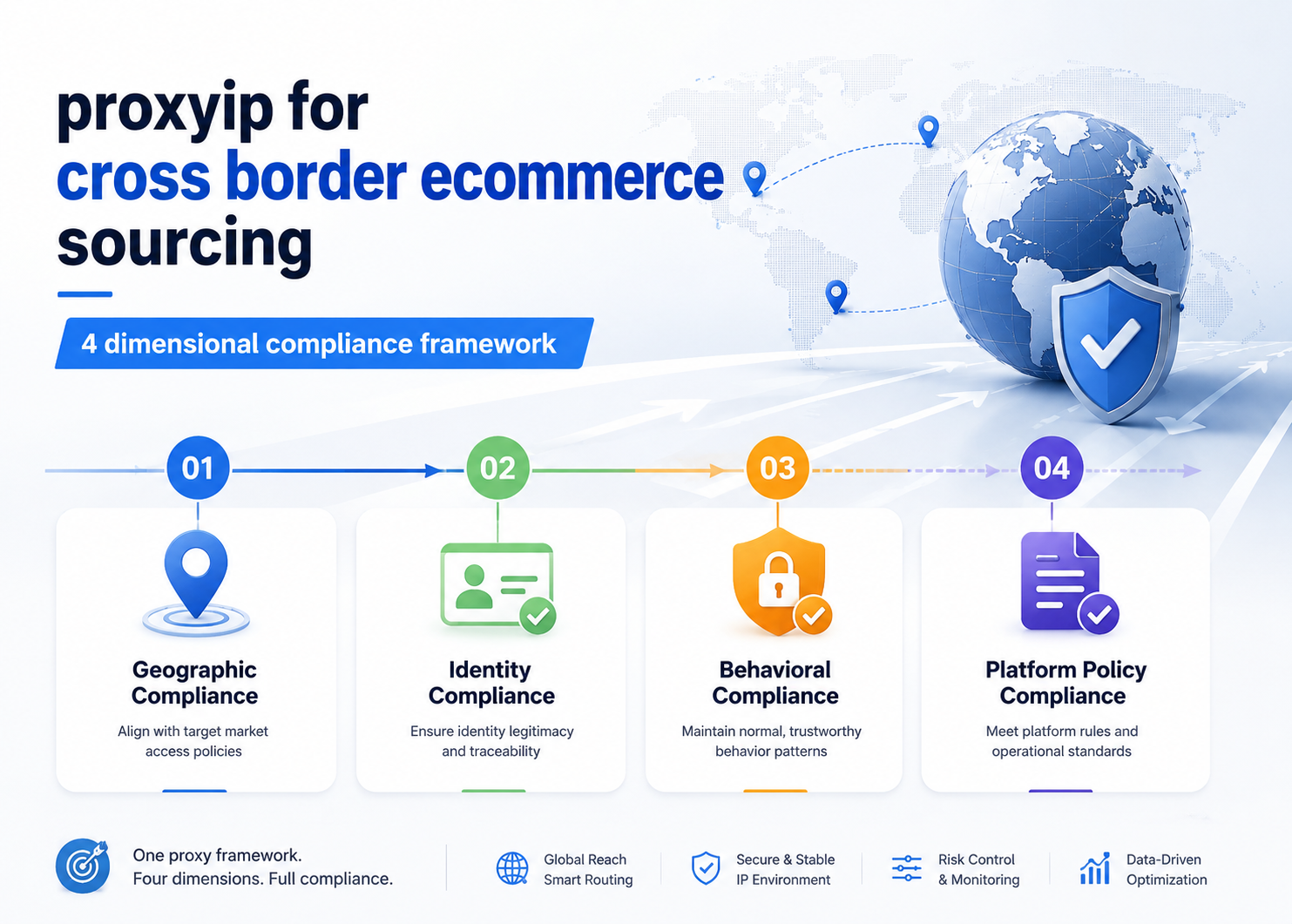
The First Misjudgment in Sourcing Data Collection: Mistaking "Works Once" for "Keeps Working"
The most common mistake cross-border sourcing teams make when evaluating proxy IPs is using "can it pull data on the first test run" as the selection criterion. "Works once" only means the current request wasn't blocked — it says nothing about whether the pipeline still runs two weeks or two months from now.
Sustained failures almost never originate in the proxy IP itself. They sit in four compliance weak points along the collection pipeline:
| Weak Point | Typical Symptom | Consequence |
|---|---|---|
| Undefined target boundary | Scraping behind-login data, triggering rate limits | Account bans, IP range contamination |
| IP type mismatch | Using datacenter IPs against platforms with strict datacenter detection | Success rate collapses, incomplete data |
| Insufficient geographic precision | Exit-IP location drifts from the target market | Distorted price, stock, and recommendation data |
| Unreasonable request cadence | High concurrency with no throttling, rotation too aggressive | Flagged as malicious crawler, entire IP ranges banned |
If you don't fix these four, switching proxy IP vendors won't help. The pipeline will keep breaking. Let's unpack the self-check logic for each dimension.
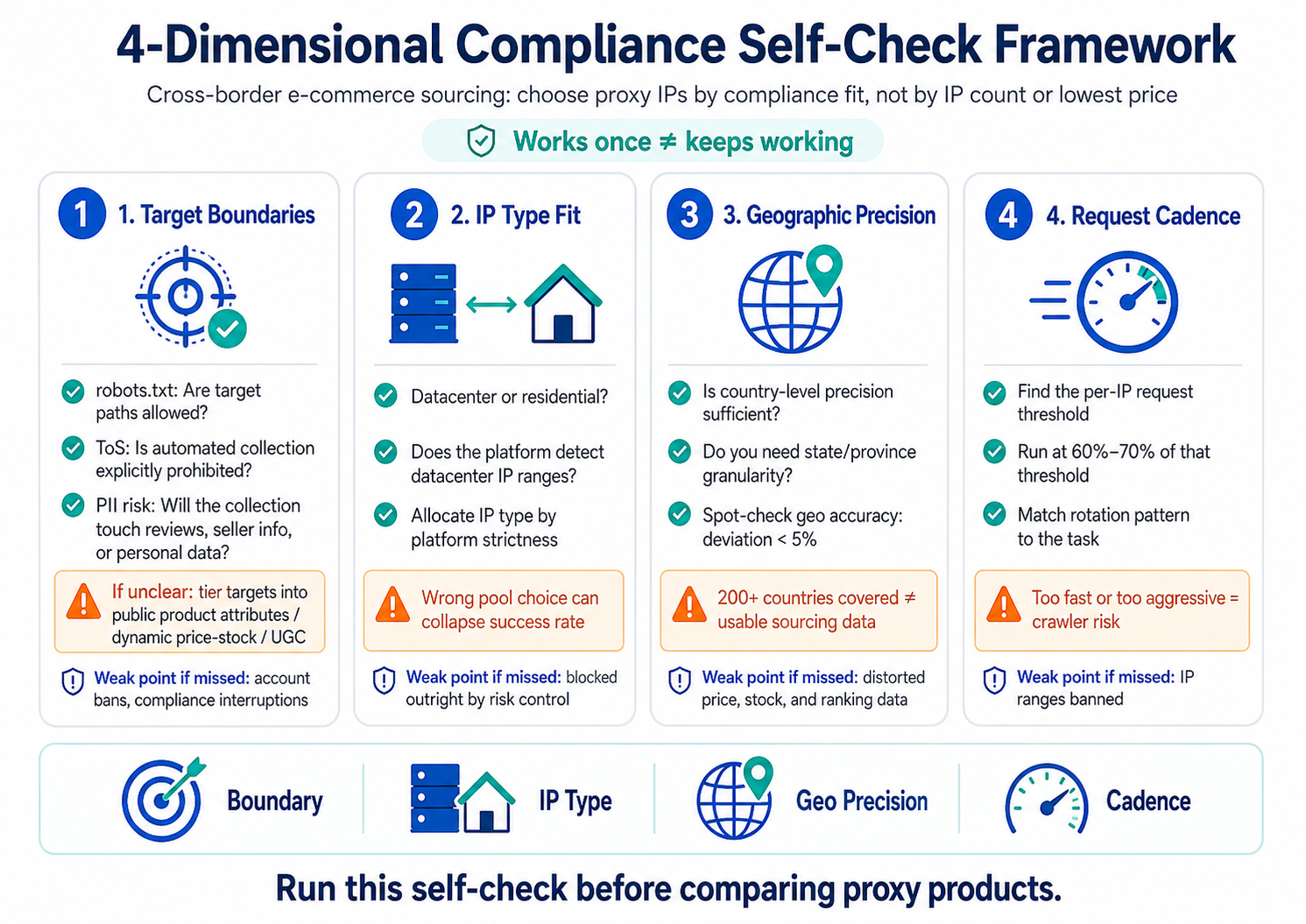
Dimension 1: Not Every Public Page Can Be Scraped Without Limits
The collectability boundary of your target data is the start of the whole pipeline — and the step most often skipped. "Publicly viewable on a page" does not equal "can be programmatically scraped without limits." Between them sit robots.txt, the platform's Terms of Service (ToS), and the data protection laws of the target market.
Three self-check questions:
1. Does robots.txt allow it? For the paths you want to collect from, is the target platform's robots.txt set to Allow or Disallow? Some e-commerce platforms Allow product listing pages but Disallow price endpoints and review endpoints.
2. Does the ToS explicitly prohibit automated collection? Even if robots.txt doesn't block you, the platform's ToS may explicitly prohibit "using automated tools to collect data in bulk" — a clause especially common on US and European e-commerce platforms.
3. What are the target market's data protection laws? When collection involves user reviews or seller information, regulations like GDPR (EU) and CCPA (California) place hard limits on Personally Identifiable Information (PII).
Practical recommendation: Tier your collection targets into three buckets — "public product attributes," "dynamic price/stock data," and "user-generated content (UGC)" — and tag each with robots.txt status, ToS risk level, and PII exposure. What's clean, collect first. What's grey, lower the frequency and volume. What's explicitly prohibited, don't touch.
One leading cross-border e-commerce SaaS provider spent two weeks auditing collection boundaries across all target platforms before integrating a proxy IP service. They trimmed the original 23 data fields down to 15 — the 8 cut fields either involved UGC or were explicitly prohibited by ToS. On paper, less data. In practice, the project ran for over 6 months continuously without a single compliance-related interruption.
Dimension 2: Pick the Wrong Pool (Datacenter vs Residential) and Risk Control Blocks You Outright
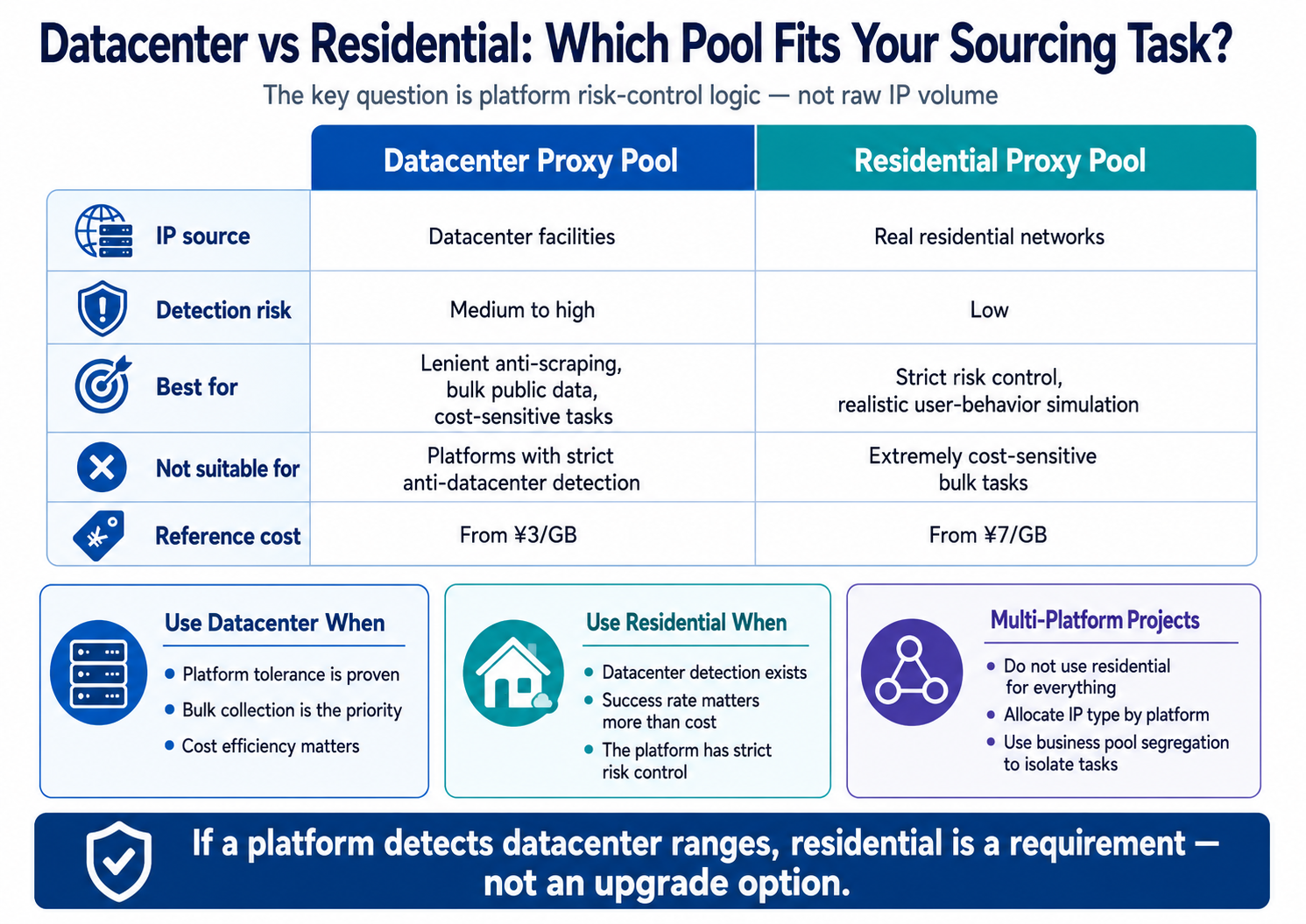
IP exit type affects collection success rate far more than total IP count does. In cross-border product sourcing, datacenter proxy pools and residential proxy pools have entirely different applicable boundaries. Picking the wrong one isn't a "bit slower" problem — it's a "blocked outright" problem.
Core differences and applicable boundaries:
| Attribute | Datacenter Proxy Pool (Super Pool) | Residential Proxy Pool |
|---|---|---|
| IP source | Datacenter facilities | Real residential networks |
| Detection risk | Medium-to-high — some platforms detect datacenter IP ranges | Low — indistinguishable from regular user exits |
| Best for | Platforms with lenient anti-scraping, bulk public data collection, cost-sensitive tasks | Platforms with strict risk control, collection requiring realistic user-behavior simulation |
| Not suitable for | Top-tier e-commerce platforms with strict anti-datacenter detection | Extremely cost-sensitive bulk tasks with low precision requirements |
| Reference cost | Overseas pay-as-you-go from ¥3/GB (Source: QG.Net website) | Overseas pay-as-you-go from ¥7/GB (Source: QG.Net website) |
Key judgment: Does the target platform have a datacenter IP range detection mechanism? If yes, residential pool is a must, not an "upgrade option." If no, datacenter pool wins on cost-effectiveness.
There's another scenario sourcing teams often overlook: a single project needs to collect data from multiple platforms with inconsistent risk-control strategies. Some platforms let datacenter IPs through cleanly; others block on the very first request. The answer here is not "use residential for everything" (cost doubles for no reason) — it's allocating IP types by platform. This is exactly what business pool segregation solves: isolating IP resources by use case so different collection tasks run through different pools and don't contaminate each other.
Dimension 3: "Coverage of 200+ Countries" Doesn't Mean Your Sourcing Data Is Usable
Geographic precision is the dimension most easily masked by big numbers. The "200+ countries/regions worldwide" coverage claim proxy vendors advertise (Source: QG.Net website) answers "can you exit through that country" — it does not answer "is what you see after exiting actually that country's real data?"
Three levels of geographic precision required by sourcing data:
The core data points in cross-border sourcing — target market price, stock, ranking, reviews — all depend on the geographic location of the accessing exit IP. Exit IP in the US, you see US-site prices. Exit IP drifts to Canada, you may see Canadian-site prices instead. One country off, and your sourcing judgment can flip outright.
1. Country-level precision sufficient? If your target markets are the US, Germany, and Japan, does the proxy service support exits precise to those specific countries — not coarse regional exits like "North America" or "Europe"?
2. Intra-country regional differences covered? For some categories, prices and stock vary by state/province within the same country. If your sourcing model needs this granularity, the proxy IP's geographic tagging precision needs to match.
3. Geographic tagging accuracy? Are IPs labeled as "US IPs" actually exiting from the US? You can spot-check a batch of IPs using IP geolocation tools. If deviation exceeds 5%, consider switching providers.
A counter-intuitive fact: IP pool size does not equal geographic precision. A tens-of-millions-scale IP pool (Source: QG.Net website) solves IP availability and rotation depth. Geographic precision depends on IP source structure and tagging system. Evaluate these two things separately when selecting.
Dimension 4: Request Frequency and Rotation Cadence — The Line Between Running and Getting Banned
Request frequency and IP rotation cadence are the variables that ultimately determine how long a collection task can run. Too fast, rotation too aggressive — the platform's risk-control system flags you as a malicious crawler. Too slow, rotation too sluggish — data freshness lags behind your sourcing decision cycle.
Two parameters to self-check:
Parameter 1: Per-IP request frequency ceiling. Different platforms have wildly different tolerance for request frequency from a single IP. Self-check method: use a single IP and test the target platform at incrementally increasing frequencies. Record the threshold frequency at which a CAPTCHA first triggers or a non-200 status code first returns. Set actual runtime frequency to 60%–70% of that threshold.
Parameter 2: IP rotation interval and pattern. The choice of rotation pattern depends on the nature of the collection task:
| Collection Task Type | Recommended Rotation Pattern | Reason |
|---|---|---|
| Bulk product listing scraping | Switch IP per request (tunnel proxy mode) | No session continuity needed; high-frequency rotation lowers per-IP exposure |
| Deep product detail page collection | Short-lived proxy, 1–60 min lifespan | Same IP needed across multi-step page navigation |
| Scheduled price/stock monitoring | Short-lived proxy, fixed exit for a period | Same IP for same page across time periods for data comparability |
QG.Net's overseas tunnel proxy with pay-as-you-go pricing — datacenter pool from ¥4/GB, residential pool from ¥7/GB (Source: QG.Net website), auto IP rotation per request, unlimited concurrency — fits the first task type (bulk listing scraping). But because tunnel proxy switches IPs every request, it does not fit tasks requiring session continuity. This boundary has to be clear at selection time. If you discover session breakage only after launch, rework costs far exceed the hour you'd have spent on the self-check.
4-Dimensional Self-Check Cheat Sheet: Run Through This Before Selecting
Here's the four dimensions condensed into one operational self-check table. Check off each row before moving on to product comparison.
| Dimension | Self-Check Item | Pass Criterion | Remediation If Failed |
|---|---|---|---|
| ① Target boundary | robots.txt audit | All collection paths set to Allow | Trim fields or lower frequency |
| ① Target boundary | ToS risk assessment | No explicit prohibition on automated collection | Legal review before proceeding |
| ① Target boundary | PII exposure check | No PII involved, or compliance plan in place | De-identify or drop the field |
| ② IP type | Target platform risk-control type | Confirmed whether datacenter IP detection exists | Spot-test 10–20 datacenter IPs to verify |
| ② IP type | IP type allocation plan | Datacenter/residential allocated by platform strictness | Use business pool segregation to isolate platform-specific IPs |
| ③ Geographic precision | Target country exit precision | Exit precise to country level, spot-check deviation <5% | Switch to a provider with finer-grained geo tagging |
| ③ Geographic precision | Geographic granularity match | Proxy granularity ≥ what the sourcing model requires | Add finer-grained IPs or adjust the sourcing model |
| ④ Request cadence | Per-IP frequency threshold | Runtime frequency ≤ 70% of platform threshold | Lower frequency or increase rotation density |
| ④ Request cadence | Rotation pattern match | Rotation pattern aligned with task type | Adjust per the task–pattern table above |
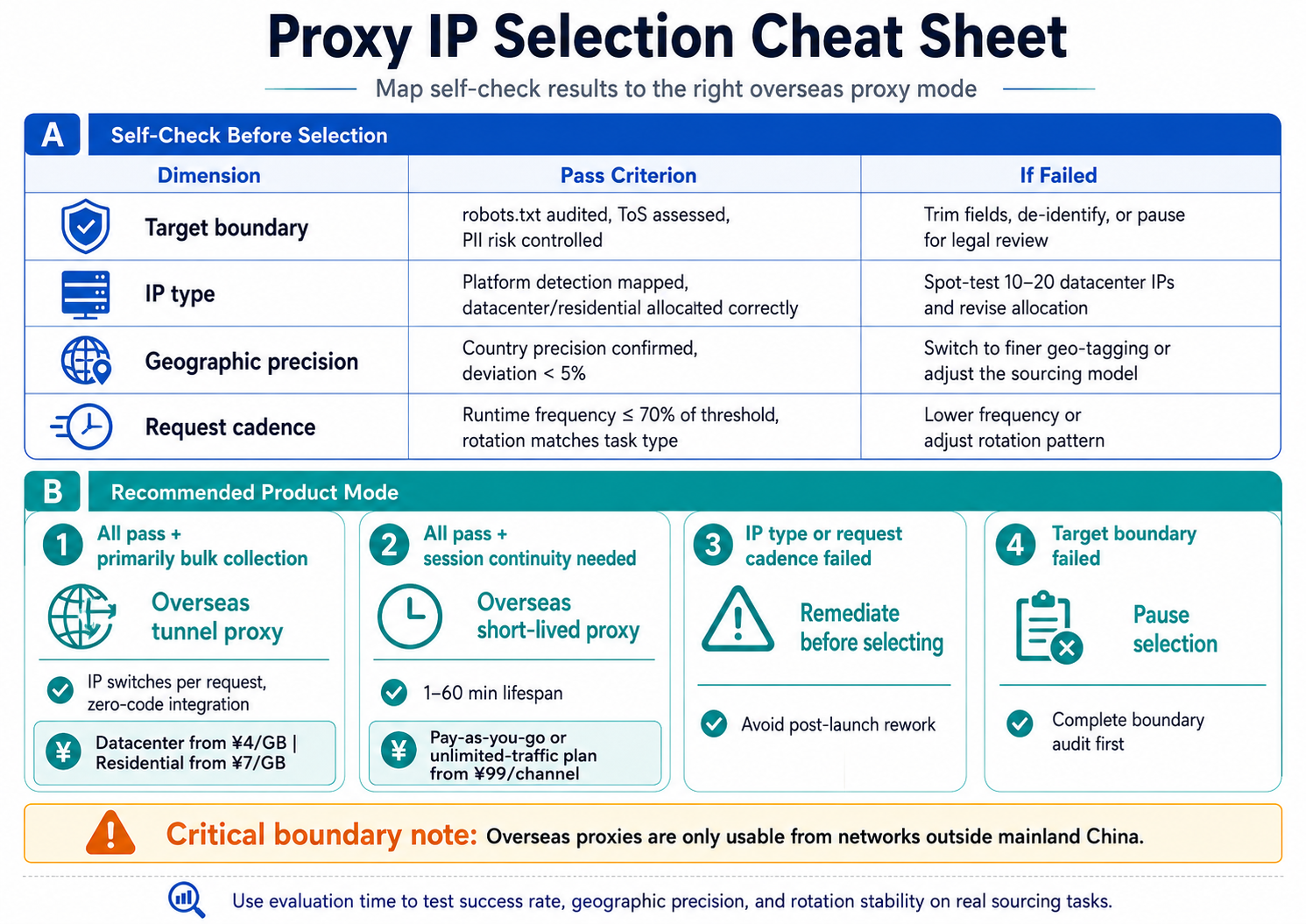
Mapping self-check results to product type:
After completing the self-check, match the result to an overseas proxy IP product mode:
| Self-Check Result | Recommended Product Mode | Reference Cost |
|---|---|---|
| All pass, primarily bulk collection | Overseas tunnel proxy (IP switches per request, zero-code integration) | Datacenter super pool from ¥4/GB, residential pool from ¥7/GB |
| All pass, session continuity needed | Overseas short-lived proxy (1–60 min lifespan) | Pay-as-you-go or unlimited-traffic plan from ¥99/channel |
| ② IP type or ④ request cadence failed | Remediate before selecting | Avoid post-launch rework |
| ① Target boundary failed | Pause selection, complete boundary audit first | — |
⚠️ Critical boundary note: Overseas proxies are only usable from networks outside mainland China. If your collection servers are deployed in mainland China, confirm your network environment meets this prerequisite before moving into product selection.
The quality of your pre-selection self-check directly determines post-launch rework rate. Running through these four dimensions takes about 1–2 working days — but it saves the time you'd otherwise spend on repeated parameter tuning, vendor switching, and redoing compliance assessments after launch. That follow-on cost is typically 5–10× the upfront self-check. During the evaluation phase, use a free trial (QG.Net offers 2 hours of complimentary test time) to run the framework against your real sourcing tasks. Success rate, geographic precision, and rotation stability measured across a continuous test cycle are far more reliable than reading spec sheets.
FAQ
Q1: Do I have to use residential IPs for cross-border sourcing? Can I not use datacenter IPs?
Not necessarily. Whether you need residential depends on the target platform's risk-control mechanism, not on "which one is more expensive." Some cross-border e-commerce platforms don't actively detect datacenter IP ranges — a datacenter pool is perfectly sufficient and considerably cheaper. Recommendation: spot-test with a small batch of datacenter IPs first. If success rate stays above 90% with no CAPTCHA triggers, the datacenter pool is the right call.
Q2: My sourcing project needs data from multiple countries. How should I allocate IPs?
Allocate exit IPs by target country, with each country running through an isolated IP group. If the target platforms in different countries also have different risk-control strategies, allocate IP types (datacenter / residential) by platform on top of that. In multi-country, multi-platform scenarios, business pool segregation isolates IP resources from different countries and platforms into their own sub-pools — if IPs in one sub-pool get banned, the other sub-pools keep running unaffected.
Q3: How do I verify the geographic precision of overseas proxy IPs?
Use IP geolocation tools (such as MaxMind GeoIP or ip-api.com) to spot-check the actual exit location of proxy IPs. Recommendation: sample 20–30 IPs per target country and record the consistency rate between labeled country and actual country. If consistency falls below 95%, the credibility of collection data from that region needs to be discounted.
Q4: Sourcing data volume is large. How do I control proxy IP cost?
The core of cost control isn't picking the cheapest IPs — it's reducing wasted requests. First complete the Dimension 1 boundary audit and cut unnecessary fields. Then use the Dimension 4 frequency self-check to compress your request rate down to 60%–70% of the platform threshold. Fewer wasted requests means the same IP budget covers more useful data. Under pay-as-you-go pricing, cutting 30% of wasted requests means a 30% direct cost reduction.
Q5: Does cross-border sourcing collection need to worry about GDPR?
Depends on what you collect. If you only collect public product attributes (title, price, stock, category), it usually doesn't touch personal data protected under GDPR. But if you collect seller contact information, user reviews (containing usernames), or buyer profile data, you may hit GDPR's PII rules — compliance review or de-identification is required. The third self-check question under Dimension 1 exists precisely to catch this kind of risk before selection.
Q6: Does the 4-dimensional self-check framework apply to overseas collection scenarios other than cross-border sourcing?
The framework's logic applies to all overseas data collection scenarios that need to run continuously — including overseas ad monitoring, competitor price tracking, and overseas sentiment monitoring. The specific self-check items under each dimension need to be adjusted by target platform and data type. In our (QG.Net) practical experience with ad monitoring, geographic deviation above 3% already distorts bid data — the self-check threshold there needs to be stricter than in sourcing scenarios. The framework is universal; the thresholds calibrate to the scenario.
